



Ghost Scalper vs Quantum Queen X: H1 Pending Orders vs Grid
Ghost Scalper vs Quantum Queen X
Compare Ghost Scalper and Quantum Queen X on XAUUSD through their entry rules, risk settings and historical test evidence. This comparison focuses on h1 pending orders vs grid and what to verify on demo.
Ghost Scalper’s source review describes H1 strategy modules and pending entries. Its unusually low historical drawdown deserves a closer look at triggered orders, fills and stops before treating it as a repeatable result.
Watch the original MT5 reviews
These videos explain the original settings and test evidence used in this comparison.
Ghost Scalper
Quantum Queen X
How Ghost Scalper trades on XAUUSD
Ghost Scalper’s review describes four XAUUSD modules called Ghost A, B, C and D. The documented H1 setup monitors for selective breakout or momentum conditions. When an enabled module identifies a qualifying setup, the EA can calculate a level, size the position and place a buy or sell pending order. The module may update that order as conditions change. A pending order gives the entry a price condition, but its eventual fill can differ from the intended level.
The source material describes stop loss, take profit and trailing management after activation. The modules can be enabled independently and have their own risk and management settings. The number of enabled modules therefore belongs in the test log. The individual settings do not establish a cap on whole-account exposure, particularly when the same breakout triggers several pending orders.
The published source review explains the broad entry mechanism. It does not establish every internal trigger or its threshold, or whether a particular broker will fill a pending order at the same price shown in the historical run. In a demo check, record the module, order direction, price changes and actual fill. Note the distance from the original trigger to the exit and whether trailing was active. This connects the advertised entry model to something observable.
See the original Ghost Scalper review and settings for the documented inputs and test evidence.
How Quantum Queen X trades Gold
Quantum Queen X runs multiple built-in Gold strategies within a grid-based engine. The source review describes an optimized default preset and Custom Strategy Mode, which lets the user choose which strategies participate. The available descriptions identify these controls but leave the precise entry filters, order types and triggers for every module unspecified. The six-month comparison here uses the v4.3 XAUUSD M1 report, so settings from other Queen releases need their own evidence.
The maximum-open-trades setting changes how many positions can be held at once. To understand its effect, read it alongside sizing and enabled strategies. Two presets with the same count limit can hold different total lots. They can also reach that limit at different prices if the initial signal or spacing differs. Review both the peak position count and the aggregate position size at the point where equity fell furthest.
A basket’s floating loss can increase even after the EA stops adding new positions. Check whether your preset has a separate exit or account protection, and distinguish a setting that blocks new trades from a setting that closes existing ones. The reviewed report shows the combined historical effect of the selected configuration, including its open exposure. The original Quantum Queen X review explains the strategy switches and trade controls in more detail.
Broker and account checks before testing
Check your broker’s XAUUSD symbol, contract size, volume step, spread, commission and margin rules. Test execution and position sizing on demo first. On a cent account, verify the quote and lot conventions before transferring presets. The broker comparison covers specific account observations, so use it to decide what to measure on your setup.
Broker referral links may earn us a commission.
Six-month XAUUSD backtests compared
Both source reports show a $1,000 initial deposit and 100% displayed history quality. The chart timeframes differ, and equivalent sizing, commission, spread and slippage assumptions are not confirmed. Treat each row as an observation from its own test.
| Report metric | Ghost Scalper | Quantum Queen X |
|---|---|---|
| Timeframe | H1 | M1 |
| Net profit | $2,889.66 | $4,403.97 |
| Relative equity drawdown | 0.84% | 69.02% |
| Profit factor | 20.65 | 4.55 |
| Total trades | 666 | 420 |
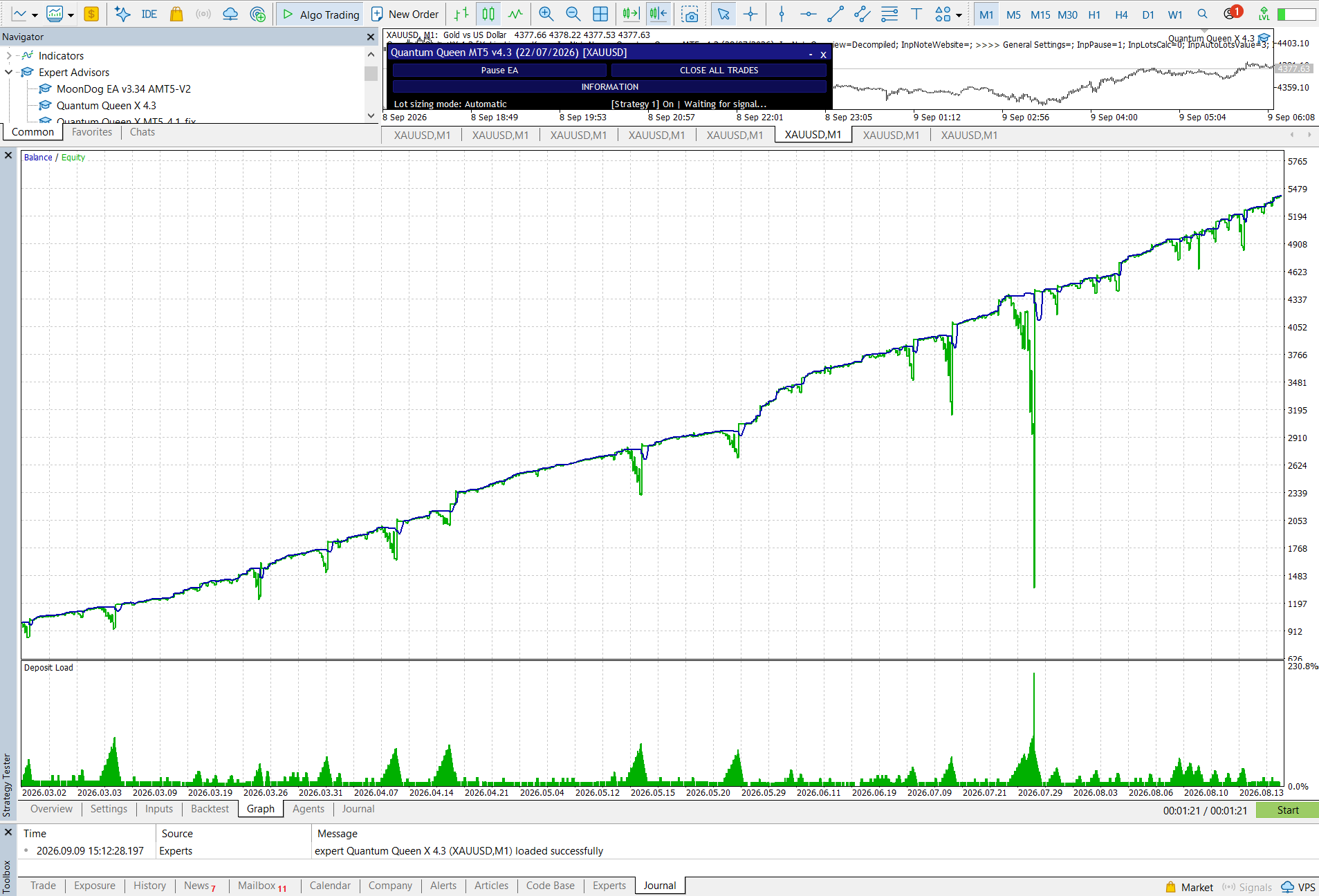
Quantum Queen X reported 69.02% relative equity drawdown in this reference run. Inspect its chart alongside the profit figure to see how open positions affected equity. A lower reported drawdown for Ghost Scalper under a different setup does not establish how either EA would behave under the same risk and execution assumptions.
Ghost Scalper charts and reports


Quantum Queen X v4.3 six-month reference

Forward-trading screenshots
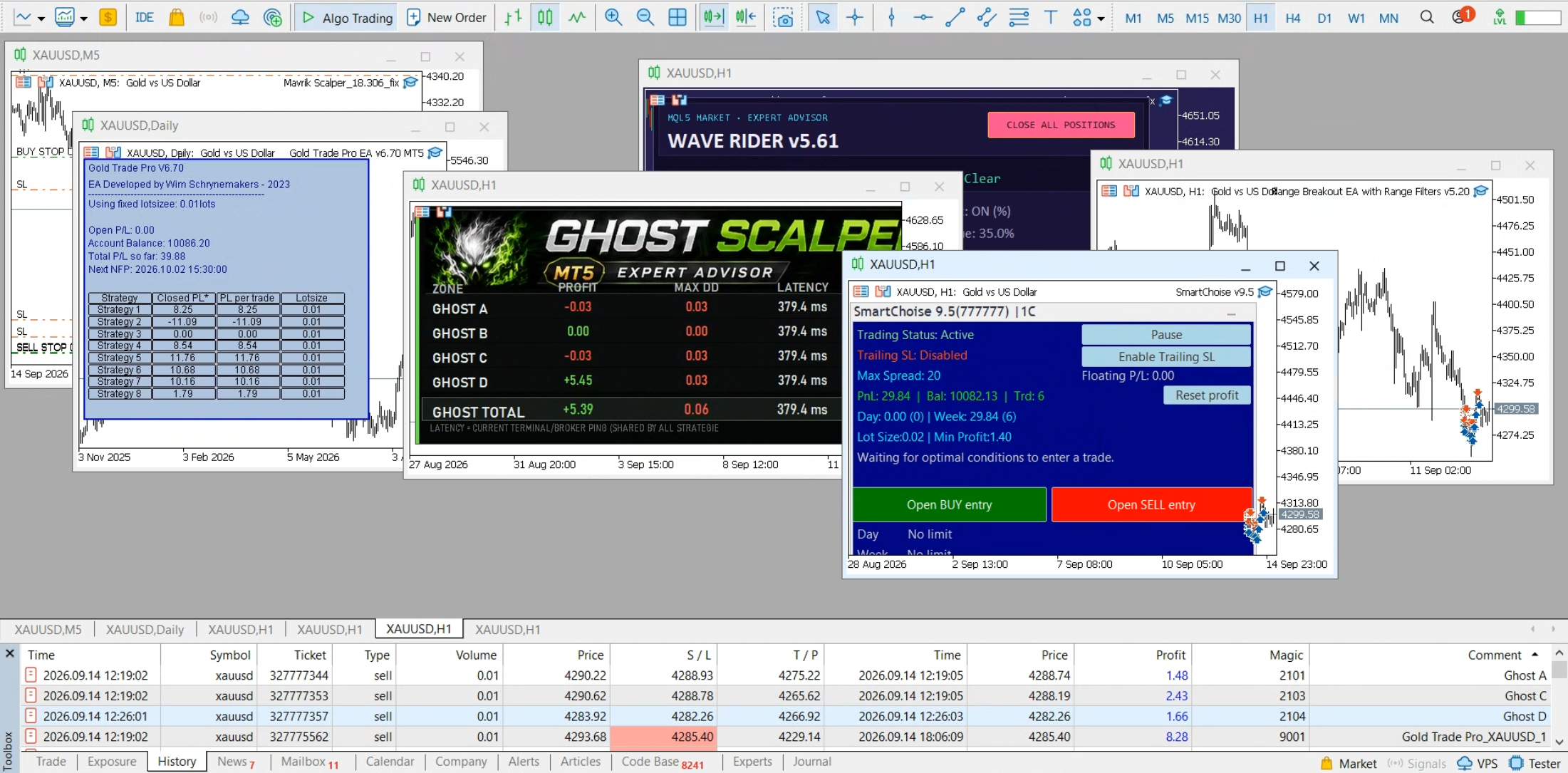
These dated snapshots show the account view captured in the source reviews. Check the period, settings and any other EAs running on the account before attributing account totals to one bot.

H1 Pending Orders vs Grid: what to look for in the trade history
Ghost’s six-month report shows 666 trades and 0.84% relative equity drawdown. That is an unusually small historical number and deserves a replay of the underlying orders. Confirm whether the chart reflects open equity through the whole sequence, whether module settings were held fixed, and whether any runs with different inputs or worse conditions were omitted from the comparison.
The strongest contrast with Queen X is where multiple exposures come from. With Ghost, more than one module can qualify at a similar breakout level. With Queen X, a grid configuration can hold several positions as a move develops. In both cases, comparing the total count without timing or lots can conceal the difference between one market episode and several independent entries.
Start the demo observation with one Ghost module enabled if the configuration allows it, then repeat with the intended module mix. Compare the frequency of overlapping entries, the size of the worst cluster and how pending orders behave around a fast market. For Queen X, log strategy switches and the maximum position setting. Check how much exposure is already open when a new entry is allowed, and whether a configured restriction only blocks the next trade.
When reviewing the charts, mark the dates of the largest equity dips and see whether balance had already recovered at those points. A closed balance curve can look calm while equity is still under pressure. If the original trade history is unavailable, use the report to identify the episode and reproduce the relevant scenario in a new test before drawing a conclusion about the cause.
Questions to check before choosing a preset
What should I check when Ghost Scalper uses pending orders?
Record the planned trigger, the actual fill and whether the order was adjusted or cancelled. Check if several modules activate during the same move before estimating combined exposure.
What can the forward screenshots tell me?
Use the visible account history to check whether timing, position sizes and execution look similar to the historical tests. Where an account carries multiple strategies, confirm trade-level attribution before comparing the account total with a single EA backtest.
What to test next
Check pending-order distance, expiry and gap fills on demo. Record whether multiple modules can enter together and how that affects open risk.
Save the version, preset and report before making changes. For a matched comparison, keep broker data, dates and costs fixed and document how you normalized exposure.
Build an EA or copy trades between accounts
BYO-Bot lets you build and test MT5 strategies without coding. cTrader Copier offers free MT5-to-MT5 copying and a paid subscription for MT5-to-cTrader copying.
Automated trading involves risk. Historical and forward snapshots are limited to the accounts, dates and configurations shown.