MoonDog EA Review 2026: XAUUSD Backtests, Comparison and Final Verdict
MoonDog EA Review: Trading Logic, Backtests and Final Verdict
We examine MoonDog EA MT5’s five-module gold breakout system, optional ONNX filtering, risk controls, historical backtests and comparison with Quantum Queen X.

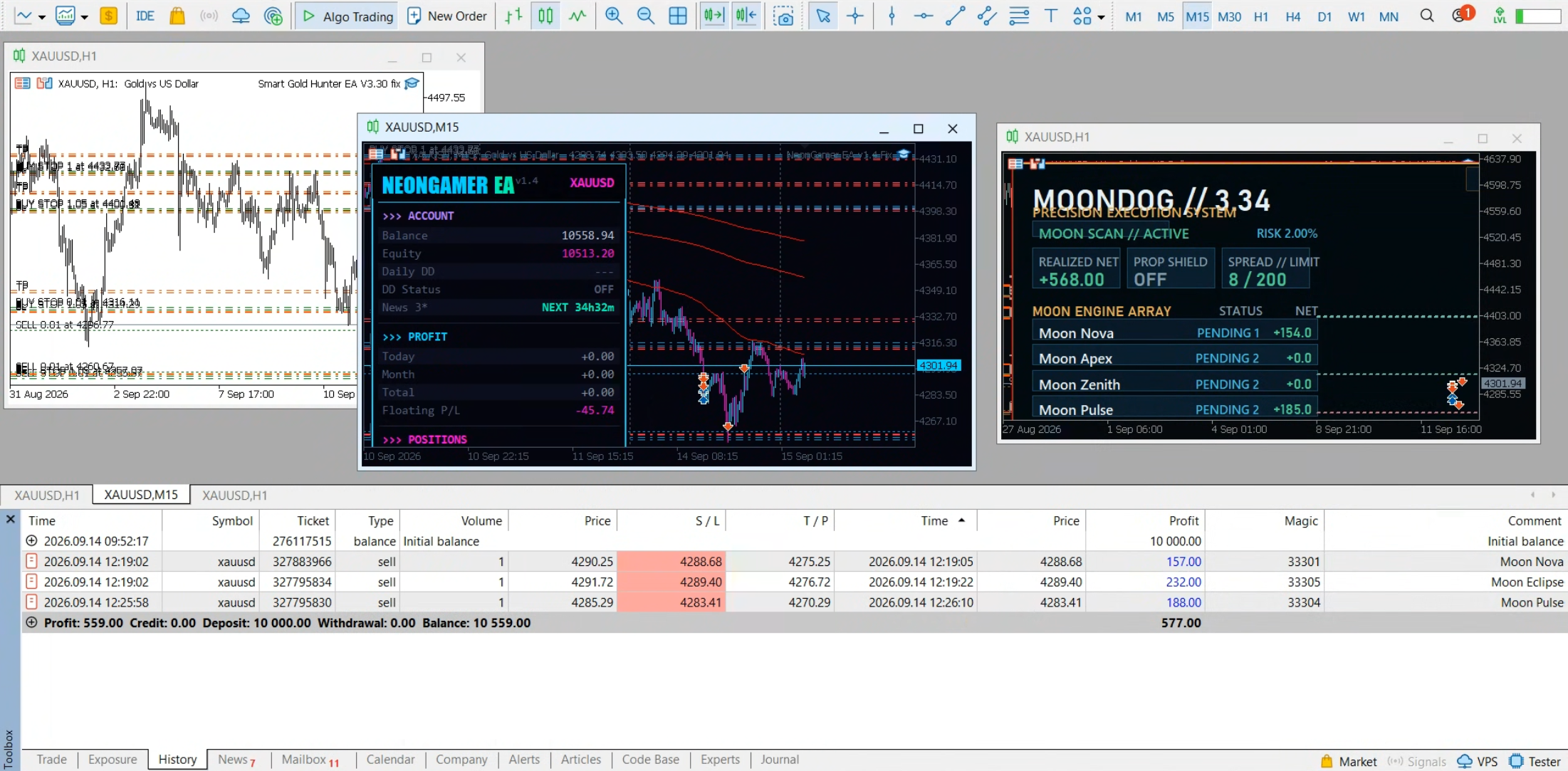
Watch the Full MoonDog EA Review
This video covers MoonDog’s trading logic, one-month and six-month MT5 backtests, its comparison with Quantum Queen X, and our final assessment.
MoonDog EA at a Glance
Market
XAUUSD gold only.
Platform
MetaTrader 5, operating from one chart.
Strategy
Five breakout and price-expansion modules.
Entry Filtering
Optional two-model ONNX setup evaluation.
Main Strength
Multiple entry approaches with configurable trade protection.
Main Concern
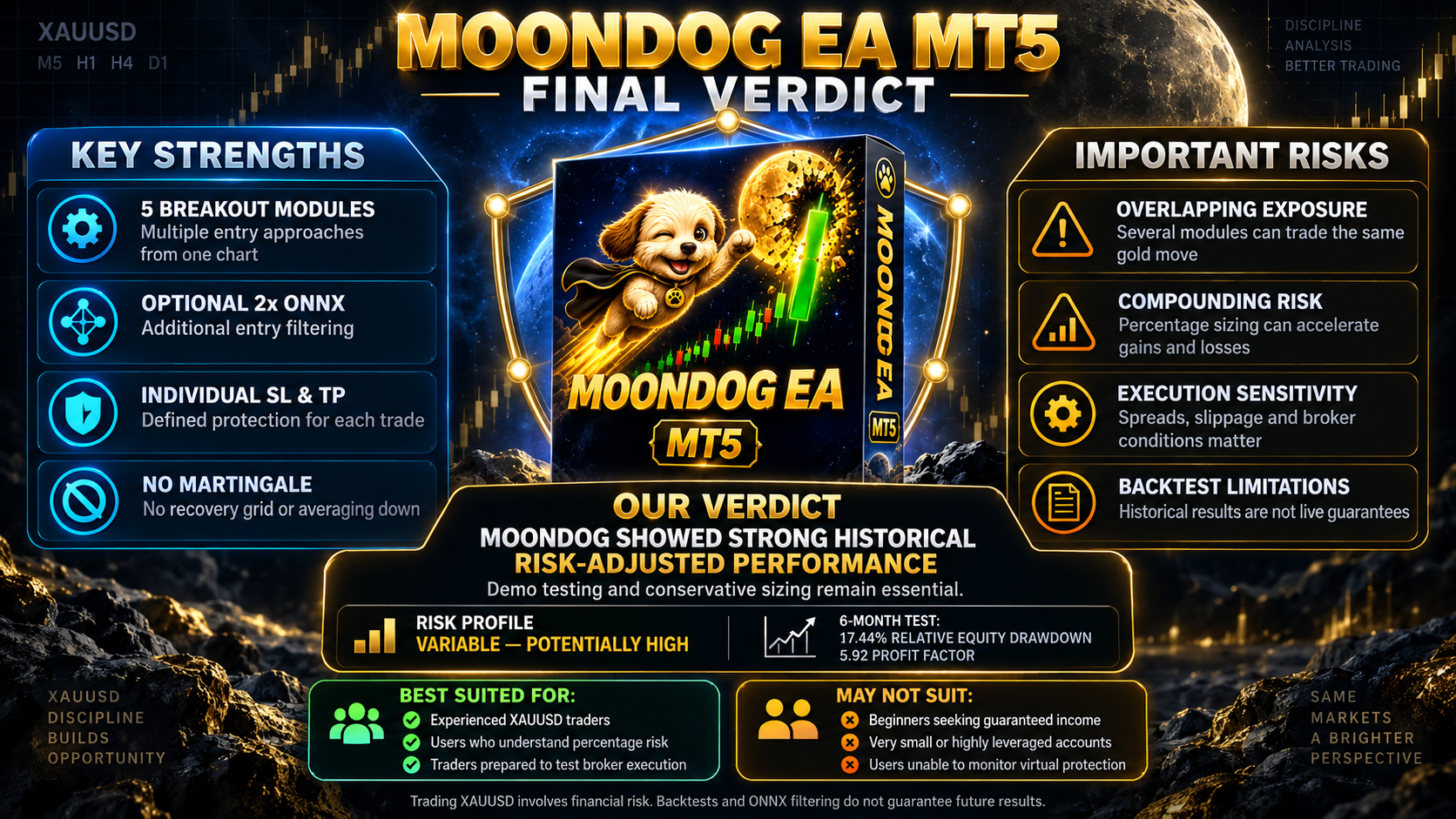
Several modules can create overlapping exposure to the same gold move.
MoonDog EA Review Summary
MoonDog EA is a multi-strategy Expert Advisor developed specifically for XAUUSD on MetaTrader 5. Instead of relying on one entry pattern, it combines five breakout modules—Moon Nova, Moon Apex, Moon Zenith, Moon Pulse and Moon Eclipse—and runs them from a single chart.
Eligible setups can place Buy Stop or Sell Stop pending orders on the broker’s server. Each activated trade is prepared with its own Stop Loss and Take Profit, while the optional MoonLock feature can protect part of a position’s peak profit after its activation level is reached.
MoonDog does not use martingale, recovery grids or averaging down to recover previous losses. Nevertheless, the absence of martingale does not make the EA low risk. Because all five modules trade gold, several positions may be exposed to the same directional move, and percentage-risk sizing can magnify both gains and losses as the account balance changes.
How MoonDog EA Trades Gold
MoonDog is built around five separate breakout modules: Moon Nova, Moon Apex, Moon Zenith, Moon Pulse and Moon Eclipse. Each module watches for its own combination of breakout and price-expansion conditions, but all five operate from one MetaTrader 5 chart.
When an eligible setup appears, MoonDog can place a Buy Stop or Sell Stop pending order on the broker’s server. Each order is prepared with its own initial Stop Loss and Take Profit. After entry, the selected protection settings manage the open position.
1. Scan
Five strategy modules monitor different XAUUSD breakout and expansion conditions without requiring five separate charts.
2. Filter
The optional two-model ONNX mode evaluates eligible setups before an entry is accepted. The models run locally inside MetaTrader 5.
3. Place
Approved setups can create Buy Stop or Sell Stop pending orders with individual Stop Loss and Take Profit levels.
4. Protect
Once a position opens, MoonDog applies its selected trade-management rules, including optional MoonLock peak-profit protection.
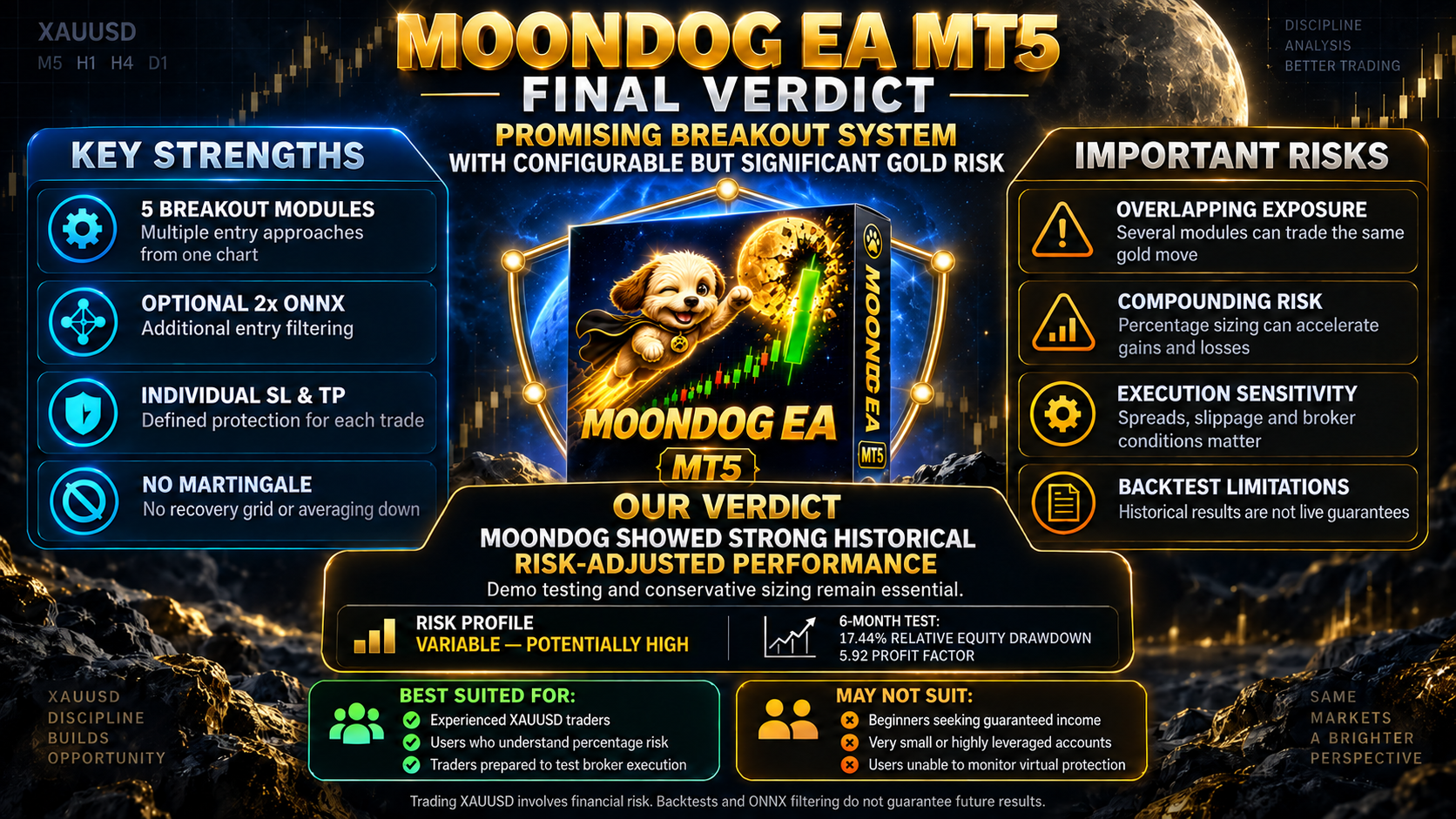
Five Breakout Modules on One Chart
The five modules do not simply duplicate one signal. They follow separate entry conditions intended to identify different forms of price expansion. This provides more than one route into the market, but it also creates an important portfolio-level risk.
Moon Nova
One of the five independent breakout-entry modules.
Moon Apex
Monitors its own qualifying XAUUSD expansion conditions.
Moon Zenith
Operates alongside the other modules from the same chart.
Moon Pulse
Uses a separate set of conditions for eligible setups.
Moon Eclipse
Completes the five-module breakout architecture.
Combined Exposure
Several modules may hold positions during the same gold move.
Standard Mode or 2x ONNX Filtering
MoonDog Without ONNX
Runs the five-module breakout system without machine-learning entry filtering. Qualifying setups are handled by the underlying strategy conditions.
MoonDog With 2x ONNX
Uses two embedded models to evaluate eligible setups and filter entries. No external signal subscription is required.
The models run locally and do not automatically retrain while the EA is trading. ONNX filtering may change which trades are accepted, but it cannot guarantee a higher win rate or better results in every market period.
Position Sizing and Risk Controls
Fixed Lot
Trades with the lot size selected by the user. The V4 default is 0.01 lot.
Percentage Risk
Calculates volume from balance, selected risk percentage and the initial Stop Loss distance.
Adaptive Sizing
With ONNX and percentage risk enabled, selected higher-scored setups can use 1.5 times the base risk.
Automatic Lot Growth
Fixed lots can increase in configured steps as account balance grows. This is separate from percentage-risk sizing.
Maximum Lot Cap
Limits the volume calculated by percentage-risk sizing.
Daily Loss Controls
Optional normal-account and prop-firm protection can be configured, but these controls are disabled by default.
Stop Loss, Take Profit and MoonLock
The initial Stop Loss is configurable, with a default distance of 20 gold pips. Take Profit targets can also be adjusted. MoonLock adds a separate layer of profit protection by tracking the position’s peak profit after an activation threshold is reached.
At its default 50% setting, an eligible trade that reaches a peak profit of $10 would aim to protect approximately $5 if the market pulls back. This is a protection target, not a guaranteed closing amount. MoonLock requests a full close of the position and does not use partial profit-taking.
News, Time and Execution Protection
High-Impact News
Separate NFP, CPI and FOMC protection windows are enabled by default. A general economic-news filter is also available but starts disabled.
Weekend Protection
Pauses new entries and requests removal of pending orders. It does not automatically close every existing position.
Spread Guard
Can pause entries and request pending-order cancellation when spread exceeds the selected threshold. It is disabled by default.
Trading Hours
Daily entry hours and automatic or custom weekend-pause times can be configured for the chosen trading environment.
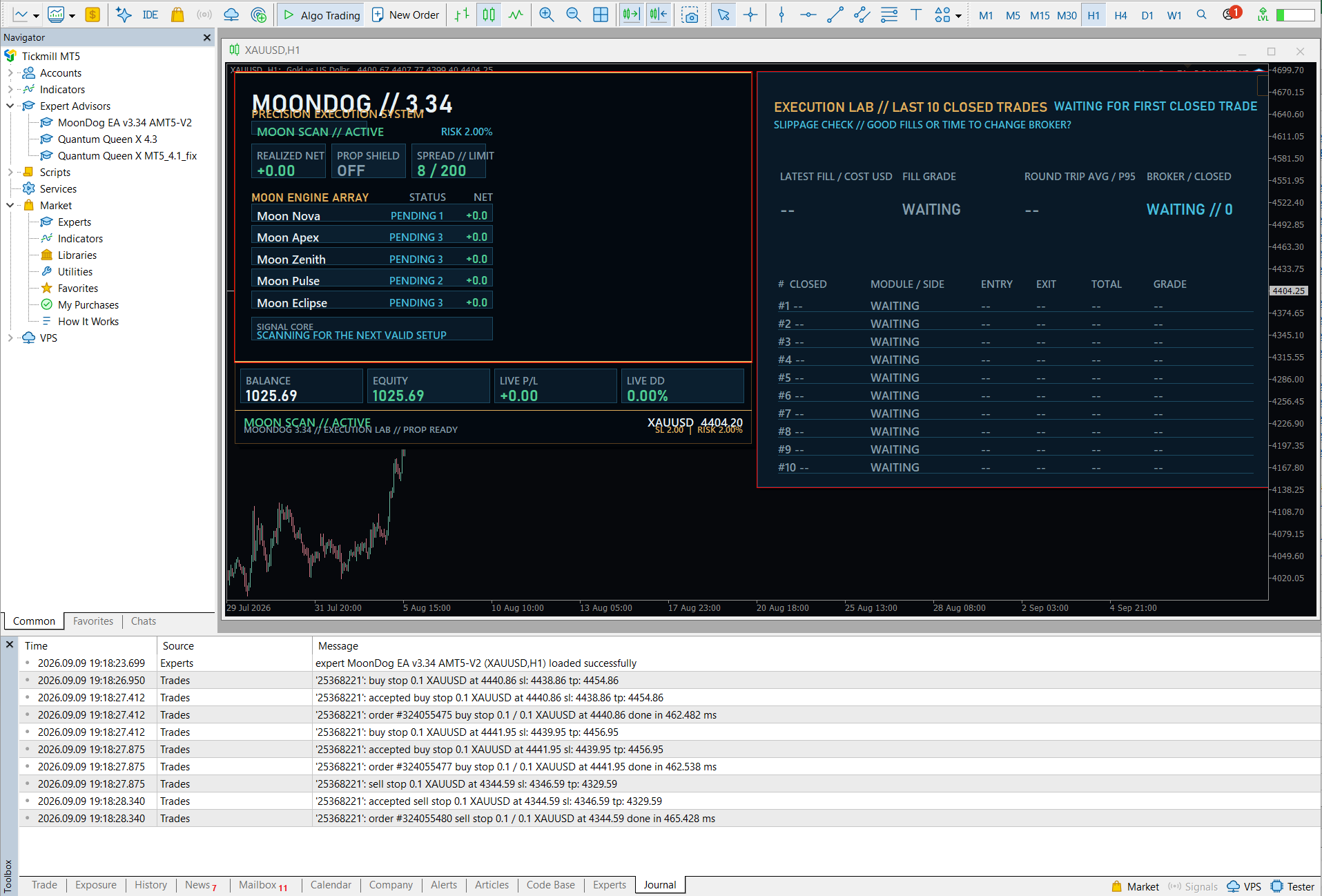
Dashboard and Manual Controls
The integrated dashboard provides a quick view of MoonDog’s trading mode, module activity and current restrictions. An expandable execution panel also records recent entry and exit slippage for review.
Cancel + Pause
Requests cancellation of MoonDog pending orders and pauses new entries.
Resume Entries
Releases the manual pause after pending-order cleanup. Other active protection rules still apply.
Close Trades
Requests closure of recognized MoonDog positions on the current symbol, including winning and losing positions.
MoonDog EA Backtest Results
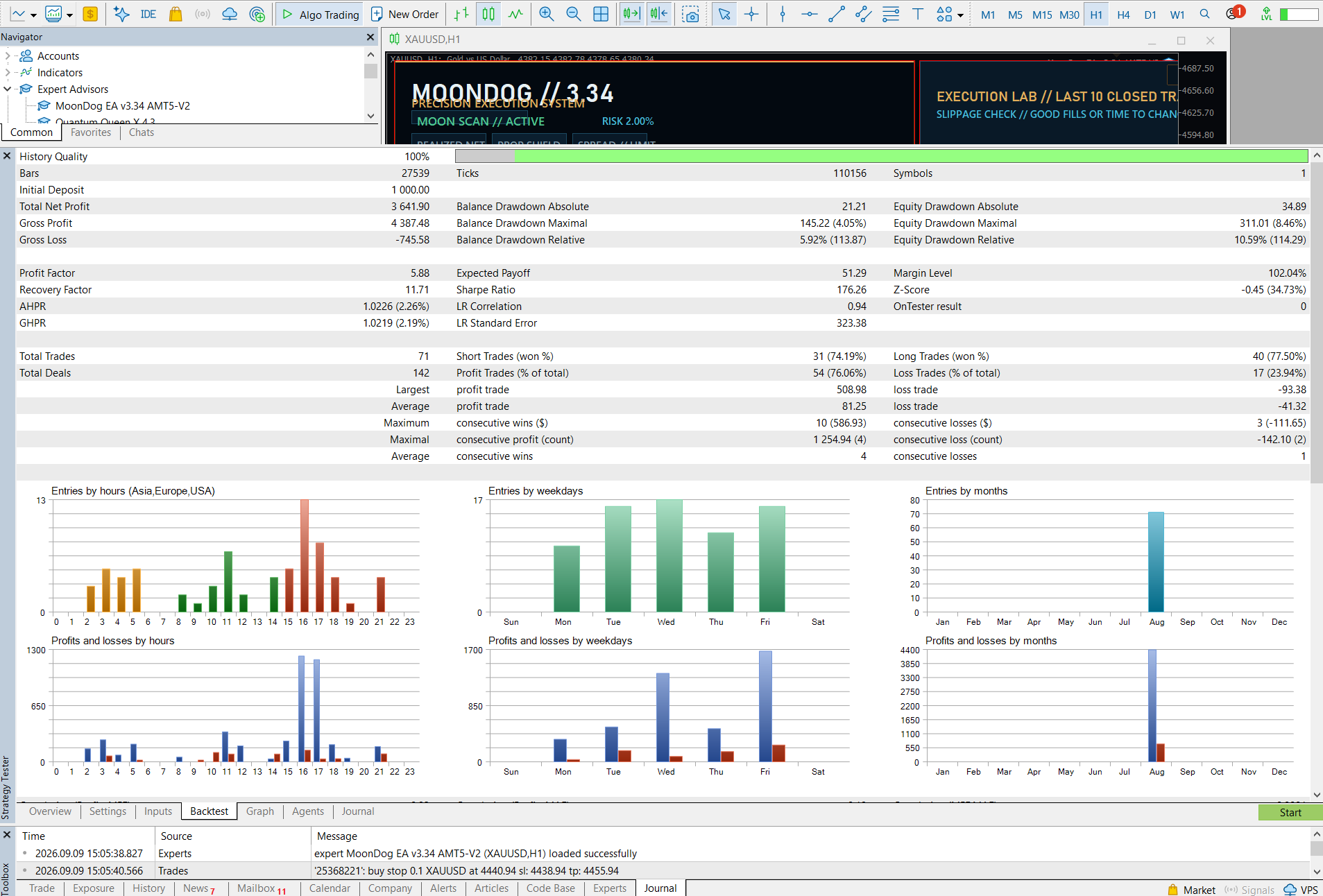
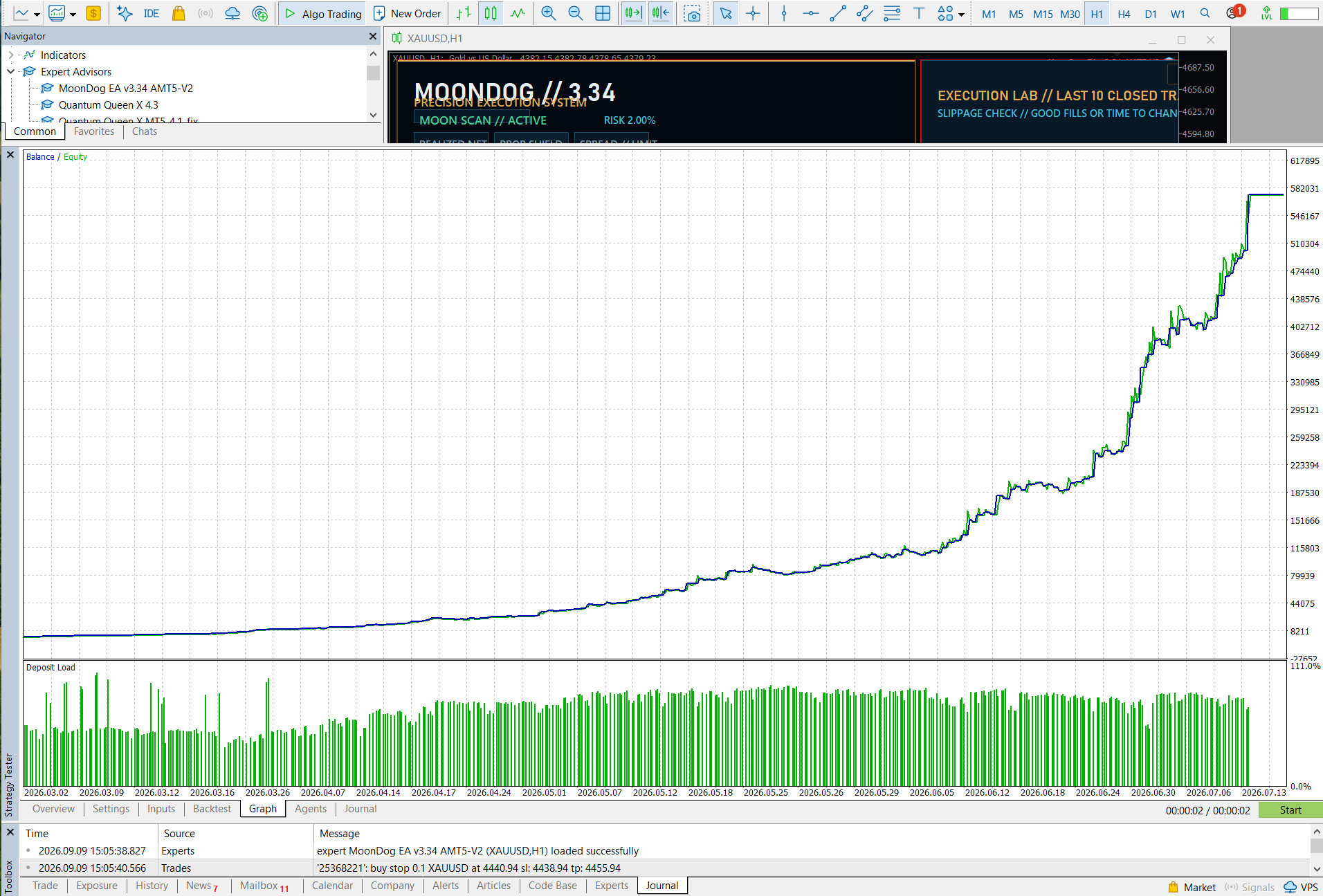
We examined two supplied MetaTrader 5 reports: a one-month test and a longer six-month test. Both began with a $1,000 deposit and displayed 100% history quality. The shorter report helps show recent behavior, while the longer period provides a broader sample of trades.
Test 1 — One-Month MoonDog Backtest
The shorter report recorded 71 trades and $3,641.90 in net profit from the $1,000 starting deposit. Its strongest headline figures were a 5.88 profit factor, a 76.06% winning-trade rate and a reported 10.59% relative equity drawdown.
One-Month Results at a Glance
| One-Month Test Detail | Reported Value |
|---|---|
| Initial Deposit | $1,000.00 |
| History Quality | 100% |
| Gross Profit | $4,387.48 |
| Gross Loss | -$745.58 |
| Profitable Trades | 54 of 71 |
| Losing Trades | 17 of 71 |
| Short Trades Won | 74.19% |
| Long Trades Won | 77.50% |
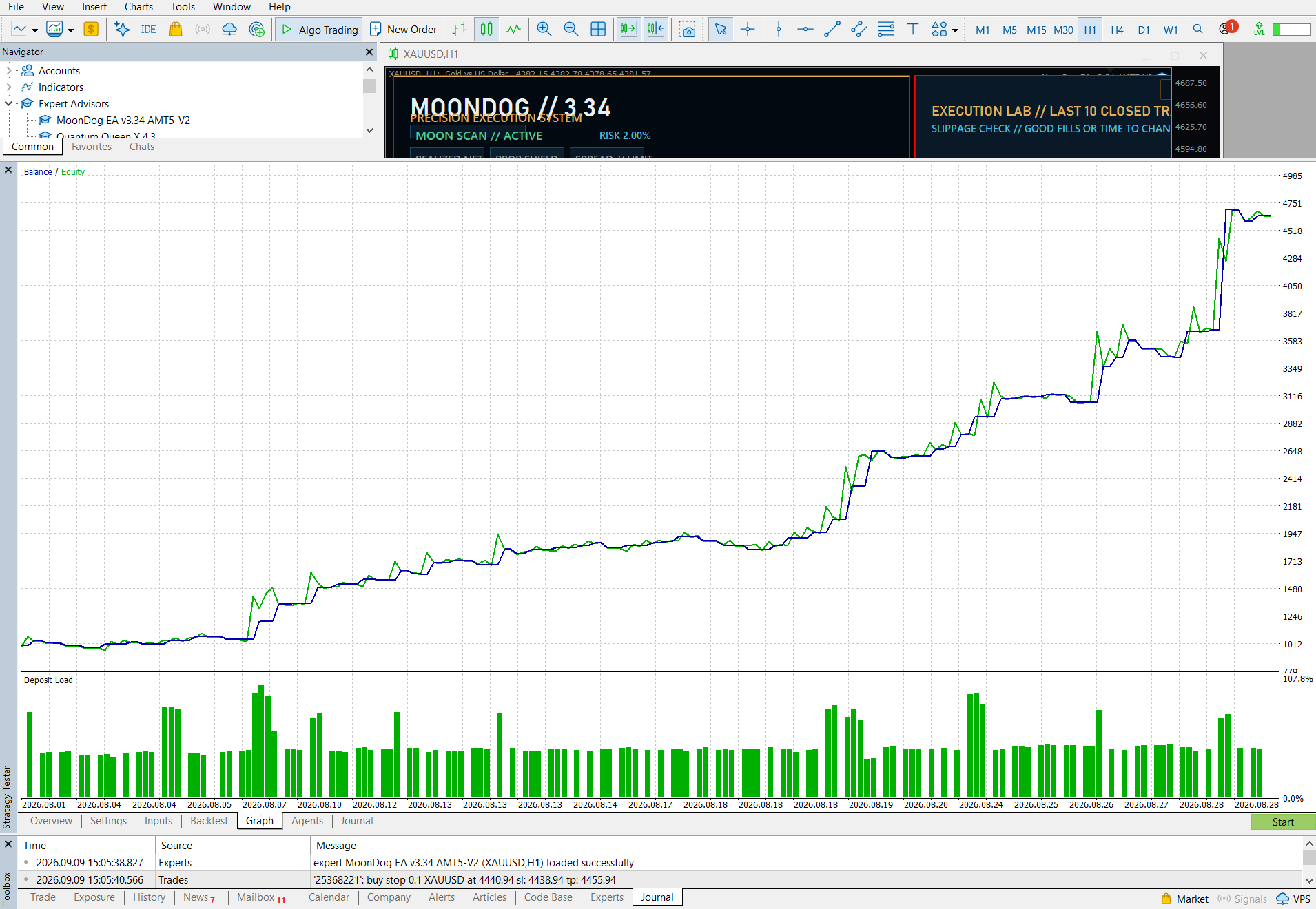
Test 2 — Six-Month MoonDog Backtest
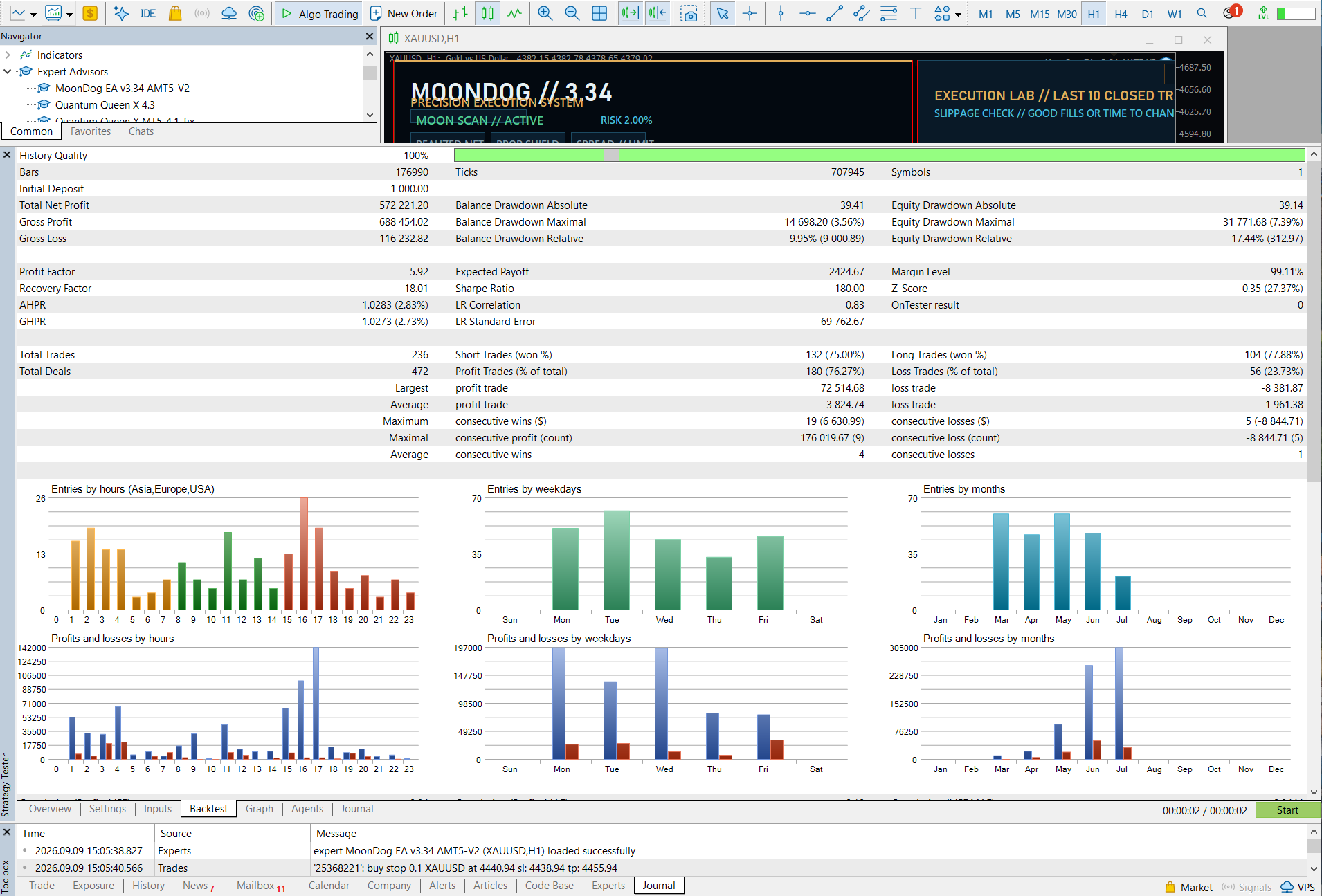
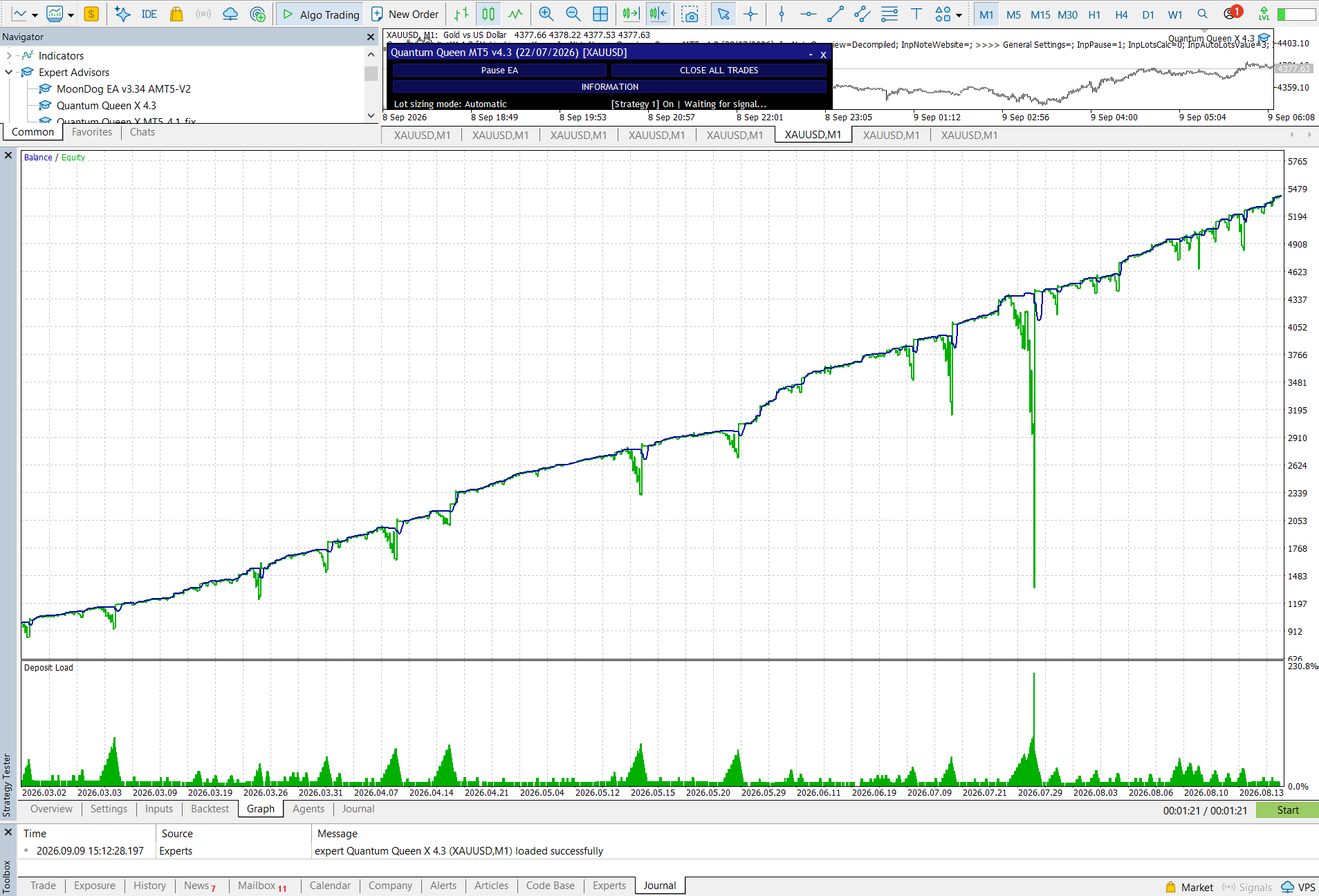
The longer report recorded 236 trades, a 76.27% winning-trade rate and a 5.92 profit factor. Relative equity drawdown increased to 17.44%, while the recovery factor rose to 18.01.
Six-Month Results at a Glance
One Month Versus Six Months
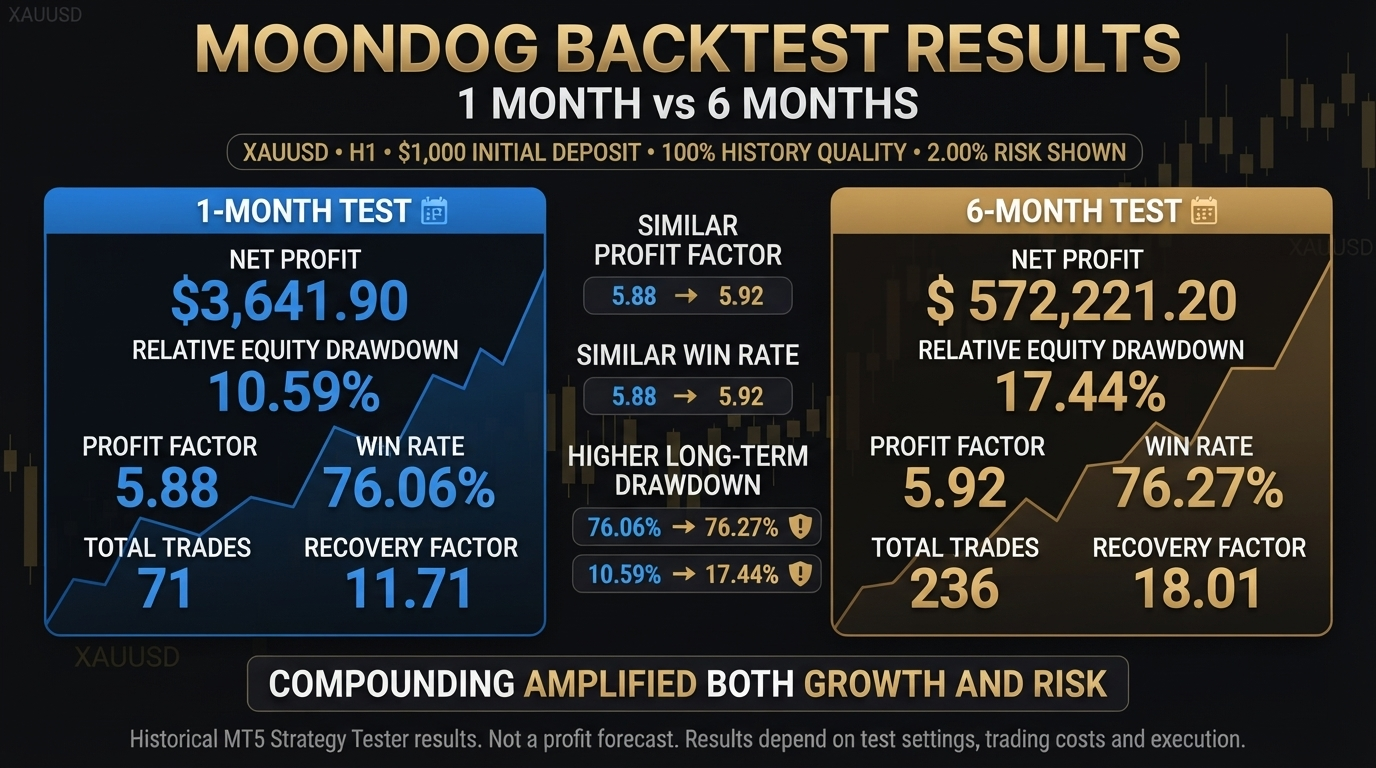
| Metric | One Month | Six Months |
|---|---|---|
| Net Profit | $3,641.90 | $572,221.20 |
| Relative Equity Drawdown | 10.59% | 17.44% |
| Profit Factor | 5.88 | 5.92 |
| Win Rate | 76.06% | 76.27% |
| Total Trades | 71 | 236 |
| Recovery Factor | 11.71 | 18.01 |
The most useful consistency signal is not the enormous compounded profit. MoonDog’s profit factor remained close to 5.9 and its winning-trade rate remained close to 76% in both reports. The longer test also produced more trades and higher relative equity drawdown, showing that a profitable historical test can still expose an account to larger temporary losses.
MoonDog vs Quantum Queen X
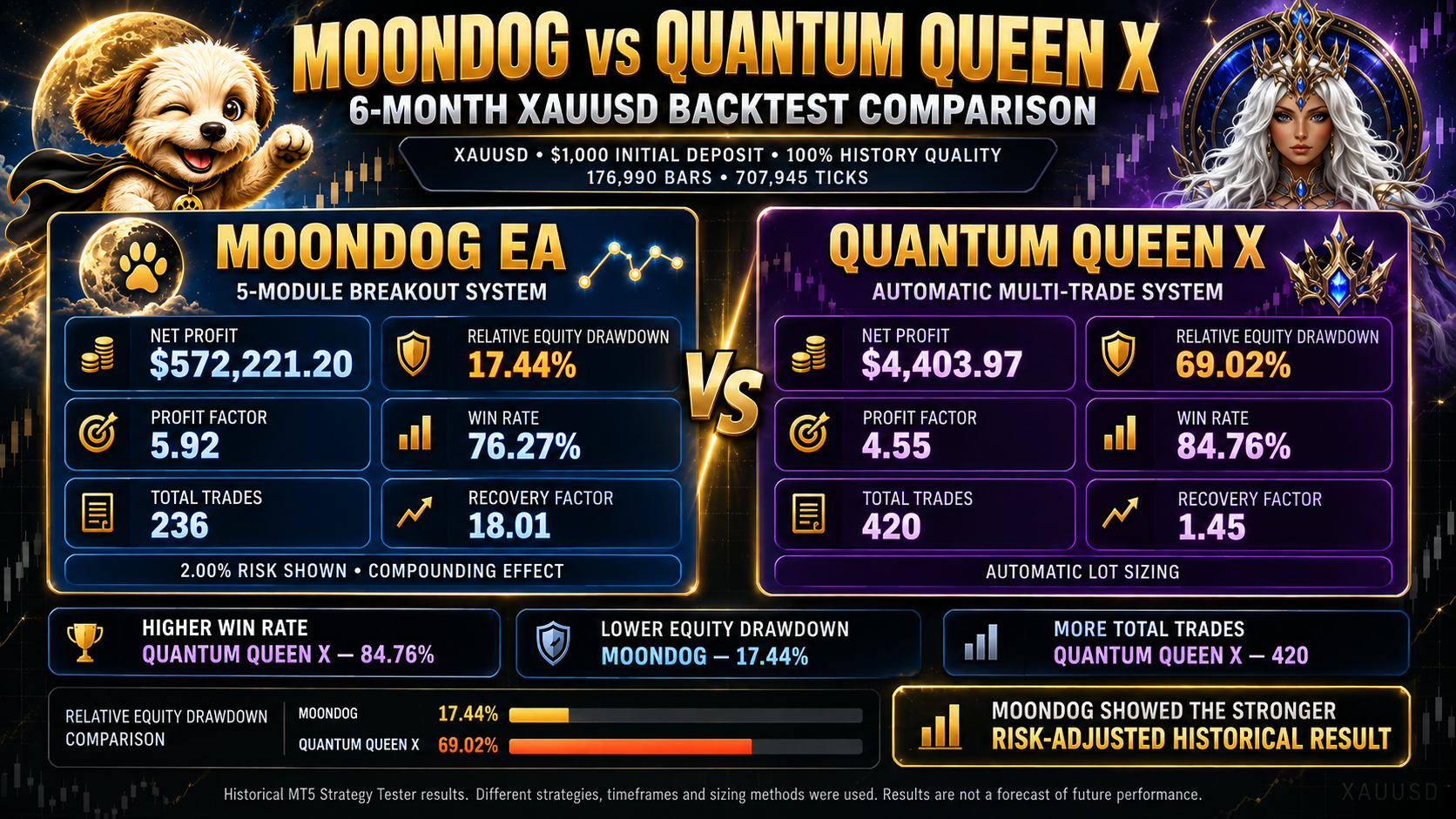
We also compared MoonDog with Quantum Queen X using six-month reports that showed the same visible $1,000 initial deposit, 100% history quality, 176,990 bars and 707,945 ticks.
| Six-Month Metric | MoonDog | Quantum Queen X |
|---|---|---|
| Net Profit | $572,221.20 | $4,403.97 |
| Relative Equity Drawdown | 17.44% | 69.02% |
| Profit Factor | 5.92 | 4.55 |
| Win Rate | 76.27% | 84.76% |
| Total Trades | 236 | 420 |
| Recovery Factor | 18.01 | 1.45 |
Quantum Queen X Advantage
Quantum Queen X traded more frequently and recorded the higher win rate: 84.76% across 420 trades.
MoonDog Advantage
MoonDog reported lower relative equity drawdown, a higher profit factor and a substantially stronger recovery factor.

Installation and First Steps
MoonDog is installed through the MetaTrader 5 Market and should be attached to an XAUUSD chart. All five strategy modules operate from that single chart, so users do not need to run five separate chart instances.
The developer supplies six presets: Default, Fixed, Low Risk, Adaptive, No ONNX and High Risk. Use a SET file intended for the installed MoonDog version, particularly after an update. A preset name is not a guarantee of safety, and the selected lot size must still suit the account.
Recommended Trading Environment
- MetaTrader 5 with a stable connection or suitable VPS.
- An XAUUSD account with competitive spreads and dependable execution.
- Correct SET file, lot size and unique Magic Number.
- Automated trading left active when virtual protection is required.
Safer Starting Process
- Read the current guide and confirm the installed version.
- Load a suitable preset and review every risk-related input.
- Run the configuration on a demo account before live trading.
- If moving live, begin with the smallest suitable position size.

MoonDog V4 Default Configuration
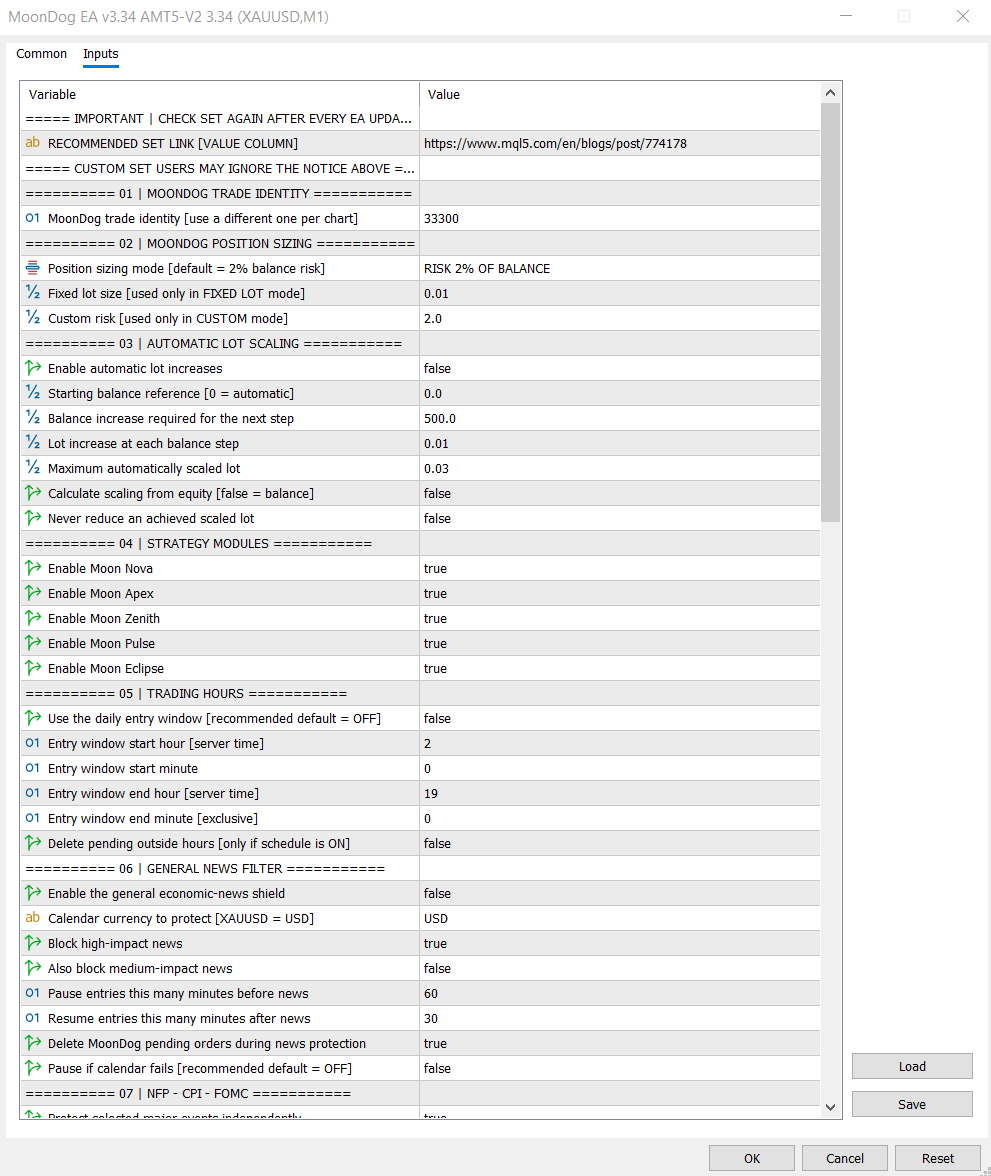
2x ONNX
Enabled by default.
Five Modules
All enabled by default.
Fixed Lot
0.01 lot by default.
Initial Stop Loss
20 gold pips by default.
MoonLock
Enabled with a 50% protection target.
Event Protection
NFP, CPI, FOMC and weekend protection enabled.
Adaptive sizing, automatic lot growth, the general news filter, wide-spread protection, normal-account daily loss limits and prop-firm mode are disabled by default. Features that exist in the EA should not be assumed active until their inputs have been checked.
Guide and Download Package
Check the current guide whenever MoonDog is updated. The matching SET files, installation notes, dashboard instructions and risk-setting explanations should be reviewed before the EA is restarted on demo or live accounts.
Pros
- Five breakout modules operate from one XAUUSD chart.
- Optional two-model ONNX filtering runs locally in MT5.
- Individual Stop Loss and Take Profit preparation for each trade.
- MoonLock adds configurable peak-profit protection.
- No martingale, recovery grid or averaging down.
- Strong risk-adjusted figures in the supplied backtests.
Cons
- Designed only for XAUUSD, so there is no market diversification.
- Several modules can create overlapping exposure to one gold move.
- Percentage sizing and adaptive risk can accelerate losses.
- Virtual protection depends on MT5 remaining online and connected.
- Backtests do not reproduce the live economic-calendar filters.
- Breakout performance can be sensitive to spread and execution quality.
Who Is MoonDog EA Best For?
MoonDog may suit experienced MetaTrader 5 users who specifically want an automated XAUUSD breakout system, understand pending-order execution and are prepared to monitor combined exposure across several strategy modules. It is most appropriate for traders willing to begin on demo, use conservative sizing and evaluate results under their own broker conditions.
Frequently Asked Questions
What market and platform does MoonDog use?
MoonDog is developed specifically for XAUUSD on MetaTrader 5. Its five modules can operate from one chart.
Does MoonDog use martingale or a recovery grid?
No. It does not increase volume because a previous trade lost, average down into losing positions or use a recovery grid. Lot size can still change through the selected sizing method, account balance or adaptive ONNX score.
What does the 2x ONNX option do?
Two embedded models evaluate eligible setups and filter entries locally inside MetaTrader 5. They do not automatically retrain while trading and cannot guarantee better future performance.
What is MoonLock?
MoonLock tracks a position’s peak profit after its activation threshold is reached and can request a full close when profit retraces toward the configured protection level. The requested closing amount is not guaranteed because execution conditions still apply.
Can the backtest results be reproduced on a live account?
There is no guarantee. Live spreads, commissions, slippage, latency, broker execution, settings and economic-news handling can produce different results.
Final Verdict
MoonDog is a feature-rich gold breakout EA with five entry modules, optional ONNX filtering, flexible position sizing, configurable event protection and a useful dashboard. Its strongest design choice is the use of defined trade protection without martingale, recovery grids or averaging down.
The supplied one-month and six-month reports showed similar profit factors and win rates, while MoonDog produced the stronger risk-adjusted historical result in our comparison with Quantum Queen X. However, the exceptionally large compounded six-month profit should not be viewed as a realistic live income expectation.
Explore MoonDog EA MT5
Review the complete product information and choose a risk level appropriate for your account. Begin with demo testing and the smallest practical lot before considering increased exposure.
Risk Disclaimer
Trading XAUUSD, foreign exchange and CFDs involves substantial financial risk and may not be suitable for every trader. Losing trades, drawdowns, gaps and execution problems can occur. Stop Losses, MoonLock and daily loss controls cannot guarantee a maximum loss. Backtests are historical simulations and are not guarantees of future or live-account performance. Spreads, commissions, slippage, broker execution, account specifications, data quality and settings can materially change results. Use demo testing and position sizes you can afford to risk. Nothing in this review is financial advice.