Kiwi Gold Bot MT5 Review – Grid Martingale Settings, Results & Guide
Gold Grid and Martingale Expert Advisor Review
Kiwi Gold Bot MT5 Review
A practical review of Kiwi Gold Bot MT5, including its Single, Grid and Grid Martingale trading modes, balance-scaled lot sizing, basket management, default settings and supplied Strategy Tester results.
- Designed for Gold / XAUUSD
- MetaTrader 5
- Grid and Martingale modes
- Balance-scaled lot management

Grid and Martingale strategies can create substantial floating drawdown. Backtests are historical simulations and do not guarantee future performance.
Quick Assessment
Quick Verdict
Kiwi Gold Bot MT5 is an automated Gold trading EA built around configurable Grid and Grid Martingale basket management. It can also operate in Single Trade mode for users who do not want recovery positions.
Its main strength is flexibility. Traders can choose how the initial lot is calculated, how far apart recovery positions are placed, how many positions are permitted and how the combined basket should close.
- Single Trade, Grid and Grid Martingale modes
- Fixed-lot or balance-scaled position sizing
- Configurable grid spacing and maximum basket size
- Basket-based take-profit and stop-loss options
- Daily drawdown, spread, session and news controls
- Live Kiwi-themed chart dashboard
Best suited to users who understand basket trading and want detailed control over Grid and Martingale risk.
Review Navigation
Table of Contents
Product Overview
What Is Kiwi Gold Bot MT5?
Kiwi Gold Bot is a MetaTrader 5 Expert Advisor designed primarily for Gold trading. It combines a signal-based initial entry with optional Grid and Martingale recovery management, while allowing users to control lot sizing, basket targets, trading sessions and account-protection rules.

Kiwi Gold Bot displays its active mode, signal status, filters, open positions, basket information and account statistics directly on the chart.
Trading Behaviour
Single Trade, Grid and Grid Martingale Modes
Kiwi Gold Bot allows the user to choose how the EA manages an initial trade after it enters the market. The Grid and Martingale switches determine whether the EA opens one position, builds an equal-lot grid, or increases position sizes across the grid basket.
| Trading Mode | Grid | Martingale | How It Behaves | Risk Level |
|---|---|---|---|---|
| Single Trade | False | False | Opens one position at a time without adding recovery trades. | Lower |
| Grid Mode | True | False | Adds positions at the configured grid distance without progressively multiplying each later position. | Medium |
| Grid Martingale | True | True | Adds grid positions and increases later volumes using the selected martingale multiplier. | Higher |
Lowest Exposure Mode
Single Trade Mode
How It Works
The EA opens one strategy position and waits until that position closes before looking for another entry. It does not create a recovery grid around the losing trade.
- One active position at a time
- No grid expansion
- No martingale multiplication
- Lower margin usage
- Simpler trade management
Advantages and Limitations
- Generally produces the lowest floating exposure
- Easier for new users to understand
- May suit traders who do not want recovery baskets
- Accepts individual losing trades more directly
- May produce a lower win rate than grid-based modes
Equal-Lot Recovery
Grid Trading Mode
Grid mode allows Kiwi Gold Bot to add recovery positions when price moves against the first entry. The positions are managed together as one basket rather than as unrelated trades.
Simplified Grid Process
Potential Benefits
- Can improve the basket entry price
- Allows recovery after a moderate retracement
- Does not require larger lots at every level
- Usually carries less risk than Grid Martingale
- Basket profit can be managed as one combined result
Main Risks
- Several positions may remain open at once
- Margin usage increases as the grid expands
- Strong trends can create deep floating drawdown
- Smaller grid spacing can fill the basket quickly
- More grid levels create more total exposure
Default High-Recovery Mode
Grid Martingale Mode
Grid Martingale mode combines grid recovery with progressively larger position sizes. The later trades have more influence on the average basket entry price, which can allow the basket to recover after a smaller market retracement.
Example Position Sequence
With a base lot of 0.01 and a multiplier of 1.50, a simplified sequence may resemble:
| Grid Level | Example Volume |
|---|---|
| Initial Position | 0.01 lot |
| Grid Level 2 | Approximately 0.02 lot |
| Grid Level 3 | Approximately 0.03 lot |
| Grid Level 4 | Approximately 0.04 lot |
Actual volume is affected by broker lot steps, maximum lot, balance scaling and free margin.
Effect on Trading
- Larger recovery positions move the basket average faster
- A smaller retracement may close the combined basket
- Profit potential can rise as the basket expands
- Margin usage also rises more quickly
- Drawdown can accelerate during prolonged trends
- Lot caps and maximum grid levels become critical
Core Trading Process
How Kiwi Gold Bot Manages a Basket
The EA begins with a signal-based entry. If Grid mode is active and price moves against the position, the EA may add another trade after the configured distance. All open positions are then managed as one basket.
Position Size
Fixed Lot and Balance Scaling
Fixed Lot
Fixed-lot mode uses the selected Lots value as the base position size, subject to broker minimum, maximum and volume-step rules.
- Exposure remains more consistent as balance changes
- Easier to understand and compare in backtests
- Useful for conservative testing
- Does not automatically compound with account growth
Balance Scaling
Balance scaling calculates the base volume from the account balance. The default uses approximately 0.01 lot for every 2,000 units of account balance.
- Automatically compounds as balance grows
- Automatically reduces exposure after balance declines
- Can increase risk faster on larger accounts
- Controlled by the maximum calculated lot cap
| Example Balance | Approximate Base Lot | Before Grid Multiplier |
|---|---|---|
| 2,000 | 0.01 lot | Base entry |
| 4,000 | 0.02 lot | Base entry |
| 10,000 | 0.05 lot | Base entry |
| 20,000 | 0.10 lot | Base entry |
High-Impact Inputs
Grid Distance, Maximum Levels and Multiplier
Grid Distance
Defines how far price must move against the basket before another position may be added.
- Smaller distance: more frequent grid additions
- Smaller distance: faster margin consumption
- Larger distance: fewer total positions
- Larger distance: slower basket recovery
Maximum Grid Levels
Limits how many positions can be opened inside the active basket.
- More levels provide more recovery capacity
- More levels require more margin
- Fewer levels limit total exposure
- The basket may stop expanding after the limit
Martingale Multiplier
Controls how quickly later grid positions increase in size.
- Higher multiplier: faster average-price adjustment
- Higher multiplier: significantly higher drawdown risk
- Lower multiplier: smoother volume growth
- Lower multiplier: may require a larger retracement
Maximum Calculated Lot
Places a hard cap on the lot size calculated by balance scaling and other volume rules.
- Prevents unlimited automatic lot growth
- Should reflect account balance and leverage
- Lower caps reduce later-basket exposure
- Broker volume limits still apply
Combined Trade Management
Basket Take Profit and Basket Stop Loss
A grid basket may contain positions of different sizes and entry prices. Kiwi Gold Bot therefore supports combined basket exits rather than relying only on the same fixed profit target for every position.
Basket Take Profit
- Monitors the combined result of the active basket
- Can scale the target with total open volume
- Closes all basket positions together
- Smaller targets may close baskets more quickly
- Larger targets increase profit ambition and reversal risk
Basket Stop Loss
- Defines an optional combined basket loss limit
- Zero may disable the basket stop-loss feature
- A lower limit exits troubled baskets sooner
- A larger limit gives more recovery room
- Allowing more recovery also permits deeper drawdown
Safety Controls
Daily Drawdown and Trading Protection
The EA includes account-level controls intended to restrict new trading or close EA-managed positions when the configured daily limit is reached.
Entry Quality
Signal, Spread, Time and News Filters
Entry Quality Mode
Controls the balance between stricter signal confirmation and trading frequency.
- Conservative mode generally produces fewer entries
- Balanced mode is the default starting profile
- Frequent mode may allow more marginal setups
Signal Timeframe
Defines the timeframe used by the main signal calculations.
- Default signal timeframe: M30
- Higher timeframes may produce fewer signals
- Lower timeframes may increase market noise
Spread Protection
Prevents new entries when the current spread exceeds the selected maximum.
- Useful during rollover and illiquid periods
- Important for short-term Gold execution
- Should match the broker’s point format
Optional Market Filters
- Candle-size filter
- ATR volatility filter
- Tick-activity filter
- Trading-session controls
- High-impact news filter
Chart Interface
Kiwi Gold Bot Live Dashboard
The on-chart panel gives users a quick view of the selected trading mode, current signal, market filters, open basket status and account information.
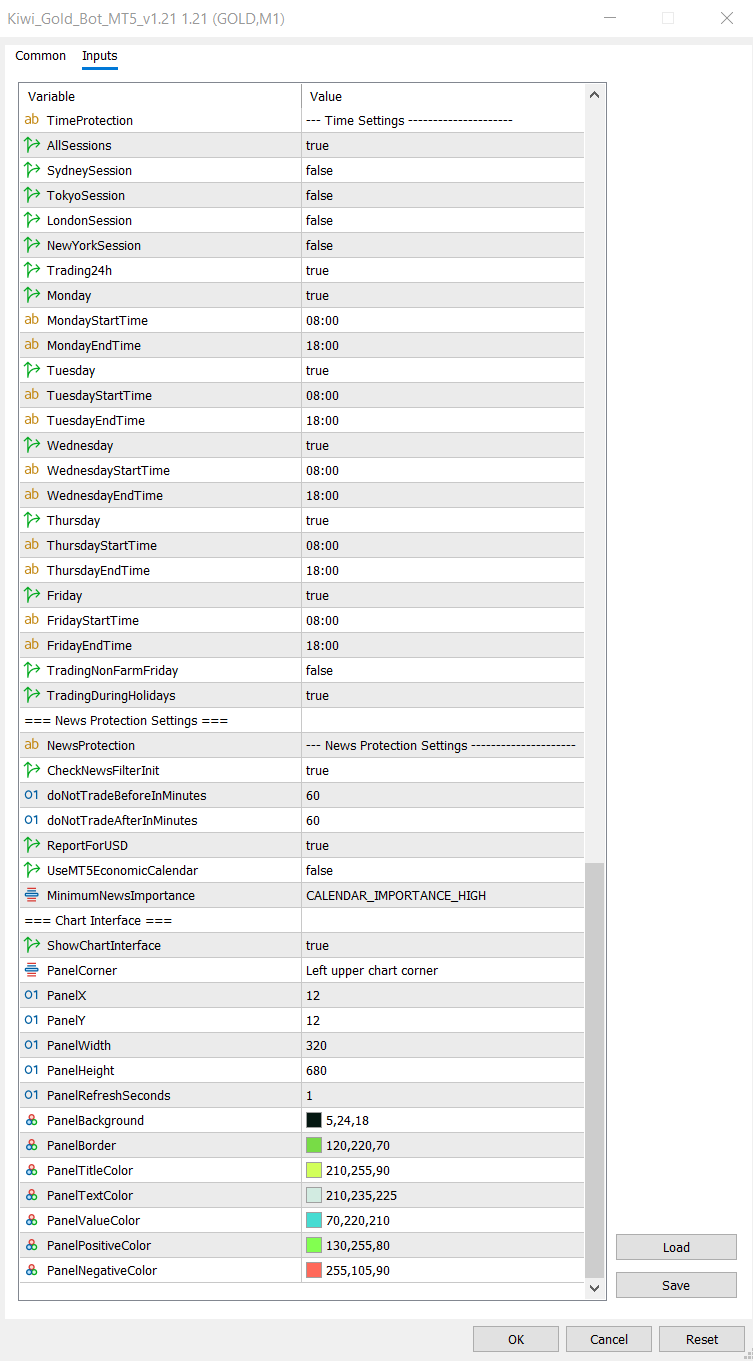
The dashboard can show trading mode, signal status, spread, session, open positions, basket result, balance, equity and daily performance.
Backtest Results
Backtest #1 – One Month Performance
The first test demonstrates Kiwi Gold Bot running with its default configuration over a one-month period. Rather than focusing on a single metric, it is more useful to evaluate the overall behaviour of the equity curve, drawdown and trade management.
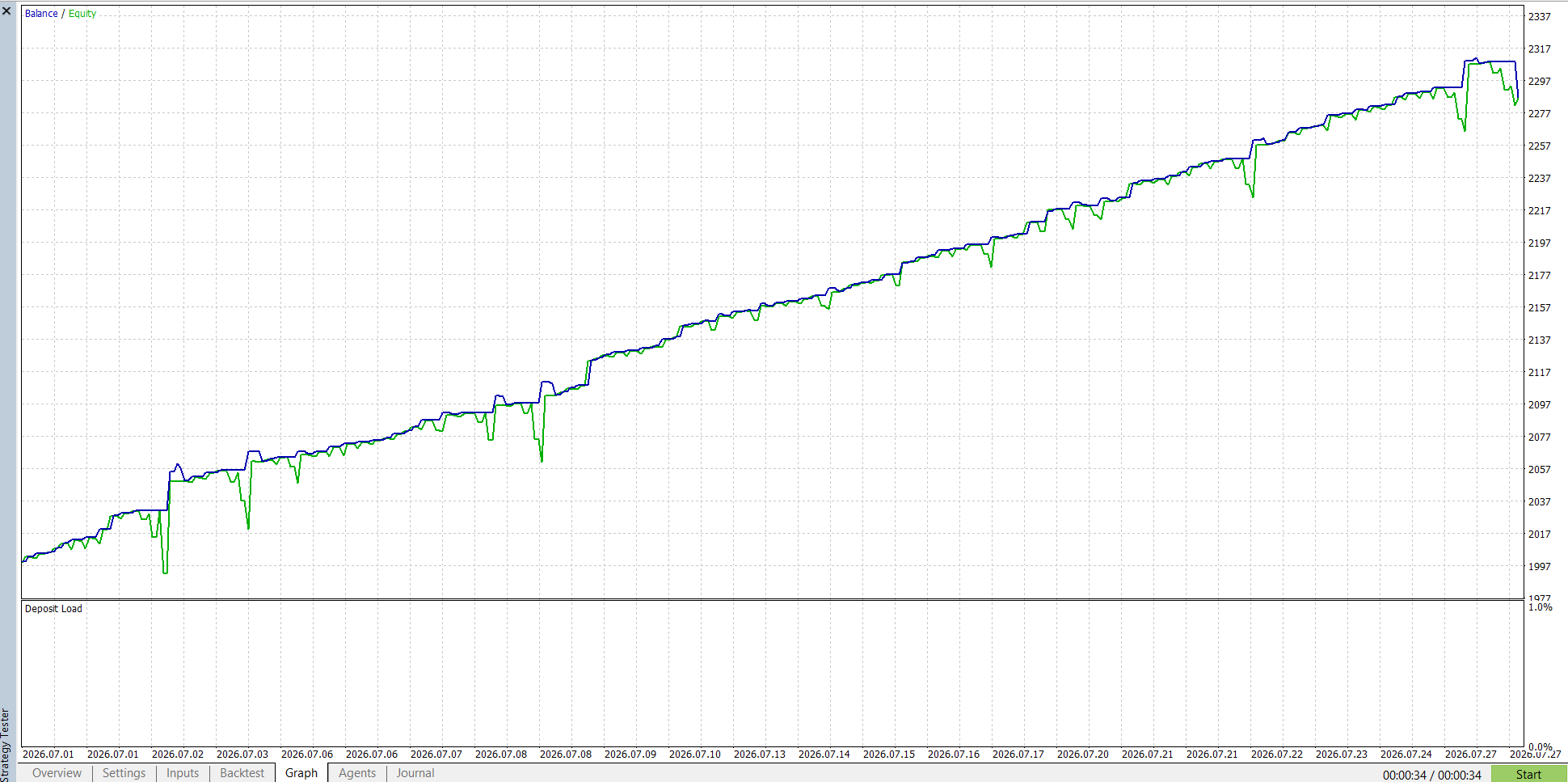
One month balance and equity performance.

MetaTrader 5 Strategy Tester report.
Longer Term Test
Backtest #2 – Six Month Performance
Longer tests help reveal how an Expert Advisor behaves through different market conditions. This provides a better indication of consistency than a short test alone.
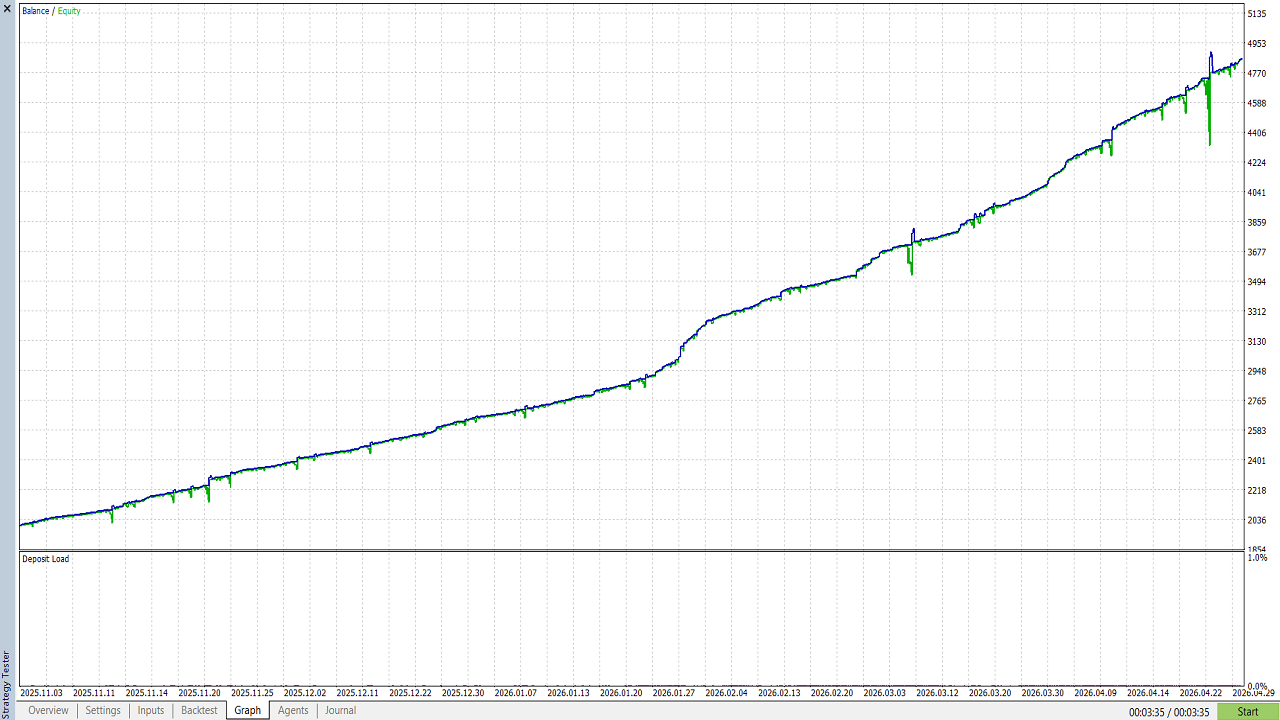
Six month balance and equity chart.
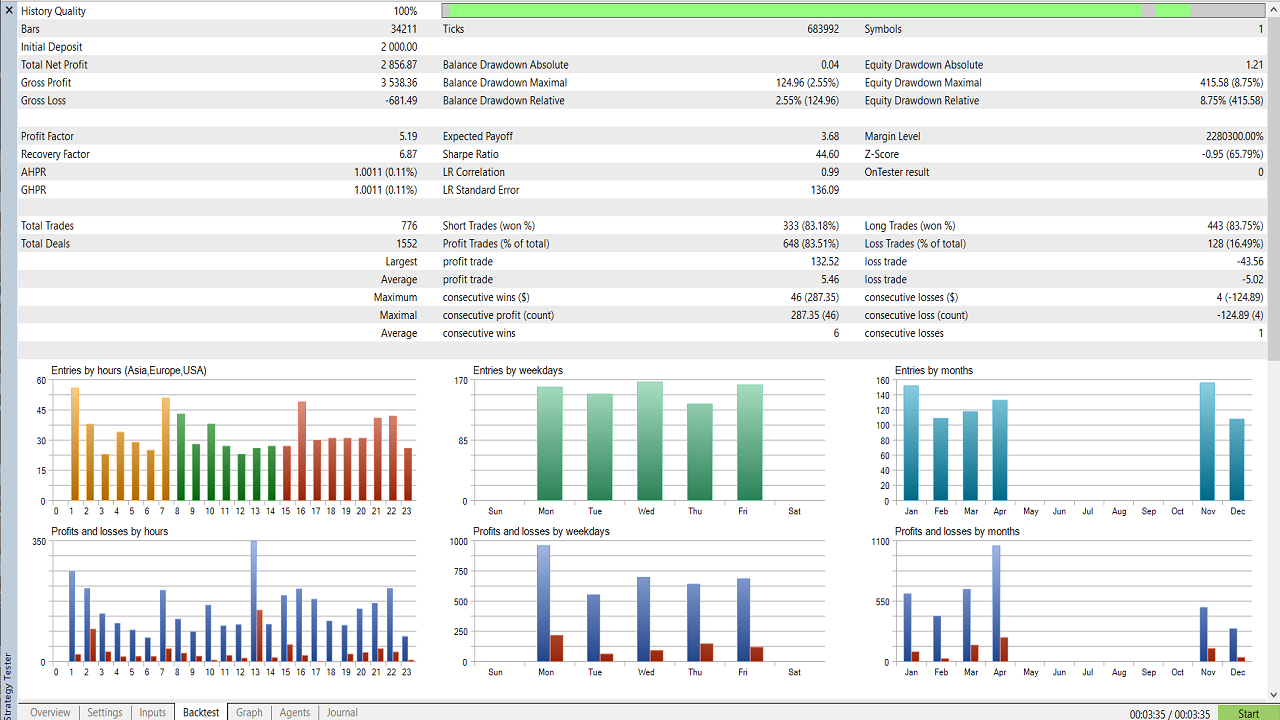
MetaTrader 5 Strategy Tester report.
Overall Impression
Performance Summary
- The one-month test demonstrates how the EA behaves over a short period.
- The six-month test provides a broader picture across changing market conditions.
- Grid baskets generally recover well during ranging markets but can experience larger floating drawdown during prolonged trends.
- Position sizing has the greatest influence on long-term account stability.
- The supplied default configuration offers a balanced starting point, but traders should always forward test on a demo account before moving to live trading.
Configuration
Settings Overview
Kiwi Gold Bot includes a large number of configurable parameters. Fortunately, only a handful of settings have a major impact on trading behaviour. Most users can leave the remaining inputs at their default values.
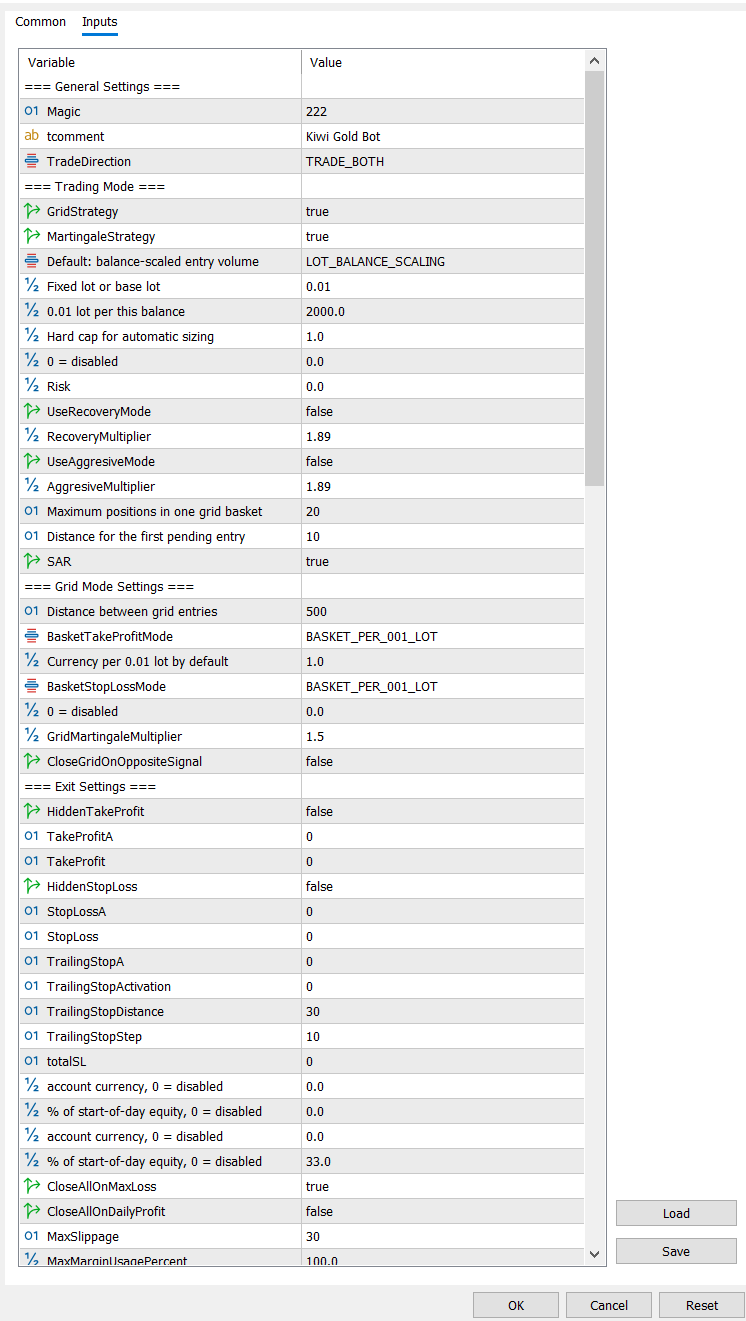
Main trading and money-management settings.
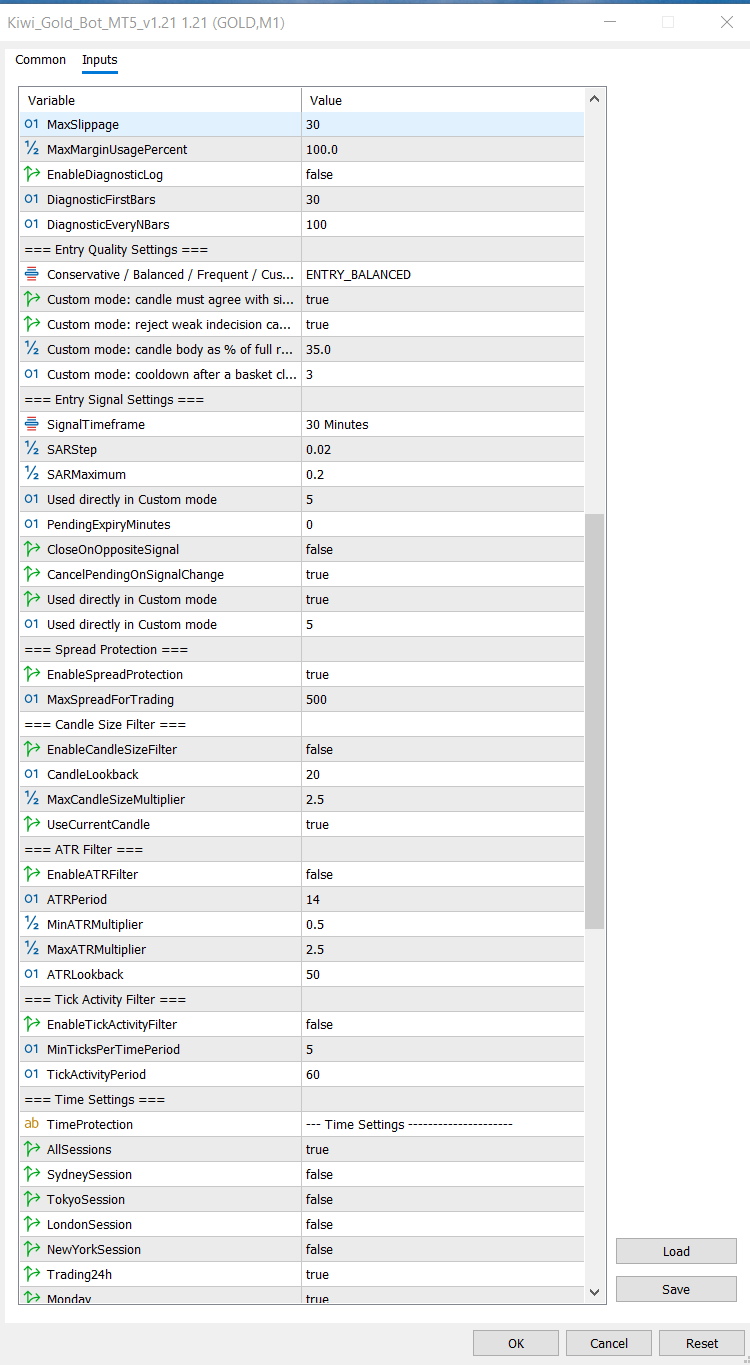
Trading filters, time controls and advanced options.
| Setting | Why It Matters |
|---|---|
| Lot Size | The most important risk setting. Larger lots increase both profit potential and drawdown. |
| Balance Scaling | Automatically adjusts position size as account balance changes. |
| Grid Distance | Controls how frequently recovery trades are added. |
| Maximum Grid Levels | Limits the total number of recovery positions. |
| Martingale Multiplier | Determines how quickly position sizes increase during recovery. |
| Daily Drawdown | Stops new trading after the configured daily loss limit. |
Getting Started
Installation
- Copy the Expert Advisor into the MT5 Experts folder.
- Restart MetaTrader 5.
- Attach Kiwi Gold Bot to a Gold (XAUUSD) chart.
- Enable Algo Trading.
- Load the recommended preset if supplied.
- Confirm the dashboard appears before trading.
- Run the EA on a demo account before live trading.
Strengths and Limitations
Kiwi Gold Bot MT5 Pros and Cons
Strengths
- Three trading modes for different risk preferences
- Fixed-lot and balance-scaled position sizing
- Configurable grid distance and maximum basket size
- Basket-based profit and loss management
- Daily drawdown protection
- Spread, session and optional news filters
- Live chart dashboard
- Detailed user guide included
- Passed MQL5 Market automatic validation
Limitations
- Grid Martingale can create substantial floating drawdown
- Risk increases quickly when lot size or multiplier is raised
- Strong one-directional Gold moves can extend basket recovery
- Broker spread, leverage and margin rules affect results
- Default settings may not suit every account size
- Backtests cannot reproduce every live trading condition
- Requires careful demo and forward testing
Trader Profile
Who Is Kiwi Gold Bot Best Suited For?
Potentially Suitable For
- MetaTrader 5 users interested in Gold automation
- Traders who understand Grid and basket management
- Users who want control over lot scaling and recovery
- Traders willing to monitor margin and drawdown
- Users prepared to complete demo forward testing
May Not Suit
- Traders expecting guaranteed profit
- Users who want zero floating drawdown
- Very small accounts using aggressive lot sizes
- Traders unfamiliar with Martingale risk
- Users unwilling to test broker-specific settings
Frequently Asked Questions
Kiwi Gold Bot MT5 FAQ
What market is Kiwi Gold Bot designed to trade?
Which platform does the EA require?
What is the default trading mode?
How do I use Single Trade mode?
How do I use Grid mode without Martingale?
Why did the EA open several positions?
Why are later positions larger?
How can I reduce drawdown?
Why is the EA not opening a trade?
Does the daily drawdown limit guarantee account safety?
Can I run the EA on multiple charts?
Should I use a VPS?
Are the supplied backtests guaranteed?
Where can I read the detailed settings guide?
Final Assessment
Final Verdict: Is Kiwi Gold Bot MT5 Worth Testing?
Kiwi Gold Bot MT5 is a flexible Gold trading EA that gives users direct control over Single Trade, Grid and Grid Martingale management.
Its strongest feature is configurability. Users can choose fixed or balance-scaled lots, adjust grid spacing and basket capacity, control the Martingale multiplier and manage the entire basket through combined profit and loss targets.
The main weakness is also clear: Grid Martingale risk can grow quickly. A profitable backtest does not remove the possibility of deep floating drawdown during a prolonged Gold trend.
Our conclusion: Kiwi Gold Bot is worth testing for traders who understand Grid and Martingale systems and are willing to use conservative position sizing. It is not suitable for anyone expecting guaranteed profit or zero drawdown.
Best Feature
The ability to switch between Single, Grid and Grid Martingale modes makes the EA useful for testing several risk profiles from the same interface.
Next Steps
Learn More About Kiwi Gold Bot
Read the detailed settings manual, compare related Expert Advisors or explore other automated trading systems before choosing a strategy.
Risk Disclaimer
Trading Gold, foreign exchange and leveraged financial instruments involves substantial risk and may not be suitable for every trader. Automated strategies can experience losses, drawdowns, execution problems and results that differ materially from historical tests.
Grid and Martingale systems can create significant floating exposure during sustained market movement. Increasing lot size, reducing grid distance, increasing the multiplier or permitting more grid levels can substantially increase margin use and account risk.
Backtests are based on historical data, modelling assumptions and specific settings. They do not guarantee future profitability. Spread, commission, slippage, latency, broker restrictions, leverage and market conditions can affect real performance.
Always complete independent testing, begin with a demo account, use appropriate position sizing and never trade money you cannot afford to lose. This review is for educational and informational purposes and is not financial advice.
Kiwi Gold Bot MT5 review prepared by TopTradingEAs.com.