
Backtest vs Forward Test: Gold EA Evidence and Practical Checks
Backtest vs Forward Test: Gold EA Evidence and Practical Checks
Distinguish a historical backtest, a tester forward split and actual account monitoring. Compare matching configurations and identify the context missing from selected screenshots.

Two different kinds of evidence
An EA backtest replays a configuration on historical data. Forward account monitoring observes what happens after a configuration is deployed. Neither establishes a future return. Historical testing helps investigate rules and adverse periods; an ongoing account record helps investigate the actual operating environment. Comparing them requires the same build, sizing method and settings, not simply the same product name.
Tester forward periods are still historical
MT5 also uses the term forward testing for a held-out part of historical data used to check an optimization. That is different from running an EA as new market prices arrive. A held-out period is useful only if its result has not repeatedly influenced the selection of settings. If you keep tuning after seeing the validation result, that period no longer offers the same independent check.
What the SmartChoise and Mavrik examples show
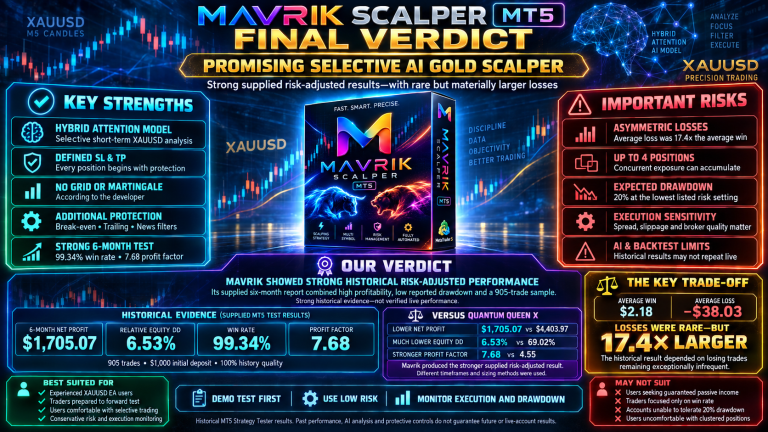
SmartChoise’s source review identifies v9.5 on H1 in its tests, while its product description references v9.6 and M1. Mavrik’s reviewed tests identify v18.306 on M5. Before comparing a forward screenshot with either report, establish which build and configuration generated the forward trades. A screenshot from a shared account cannot supply the missing version or risk inputs by itself.
Build a comparison record
Keep the original report, settings file, symbol specification, data period and cost assumptions. Record deployment date, subsequent setting changes, account type, open positions and cash flows. Compare exposure duration and equity behaviour as well as closed profit. A short profitable monitoring window can miss the difficult conditions included in a longer historical test; a long simulation can still omit live execution problems.
What would strengthen the evidence
A continuous, attributable history with settings and open equity would add more than another selected winning screenshot. Broker-side statements or independently tracked records can improve traceability when available, but their scope still matters. Here the images remain selected evidence. We do not infer verified live status, uninterrupted operation or a controlled head-to-head comparison from them.
Broker Conditions and Nano Account Checks
Execution conditions and contract specifications can change the result of the same configuration. Our broker comparison concerns Quantum Queen under its stated test conditions; it does not establish the best broker for every EA. Confirm the legal entity, symbol suffix, contract size, tick value, minimum volume, lot step, commission and swap before comparing reports.
The site owner uses FxPro’s Nano account. Availability depends on region and broker entity. A cent-denominated balance changes display units: 1,000 USC equals USD10. It does not itself establish a smaller gold contract or suitable EA lot calculation. Do not assume Tickmill offers the same Nano account. Begin by checking the relevant broker’s current specifications and a controlled demo setup.
Referral disclosure: the broker links below are referral links; TopTradingEAs may receive compensation.
An Original Report to Inspect
Use this source report as a worked reading example, not as a recommended return target. Its version, account conditions and selected period belong to that historical test.

Selected Forward Evidence
SmartChoise-labelled history with several other EA windows visible.

Build MT5 EAs or copy trades between accounts
BYO-Bot is Windows software for building and testing MT5 strategies without coding. Free Edition exports eligible Single Position bots using standard exits with Loss Recovery off; premium export features require a paid licence. cTrader Copier offers free MT5-to-MT5 copying and MT5-to-cTrader copying with a paid subscription.
Related Reviews and Product Research
Follow the original reviews for the tested builds, configurations and complete source context. Product pages describe the available package; they do not verify a future return.
A Practical Evidence Checklist
- Record the EA build, platform, symbol and exact period.
- Save sizing and enabled management inputs, rather than relying on a product label.
- Read the full report and original image; distinguish closed results from open equity.
- Separate bot-labelled activity from shared-account totals and cash flows.
- Use realistic broker costs and a new observation period before drawing deployment conclusions.
The examples here are reused source evidence, not new test runs conducted for this guide. A report can support a specific observation without proving a general claim about an EA. Keep missing configuration details visible and avoid converting a selected screenshot into an expected income projection.
Further Reading
MetaTrader 5 testing report reference and Strategy Tester documentation explain the platform terminology. For broader context, see how to choose a gold EA and our forward screenshot catalogue.
Risk Disclaimer
Leveraged gold and forex trading can cause substantial losses. Historical tests and selected monitoring screenshots do not guarantee future outcomes. Costs, settings, position sizing, market data and execution affect results. This guide is educational information, not personalized financial advice.
Practice this lesson
Classify one report and one forward screenshot from this article. Record their dates, configuration, account basis and what each cannot establish.
Ready to continue when: You do not describe a historical forward split as a live track record or combine unmatched results into one return.
Keep your notes locally. These reading lessons do not save progress or require an account. Use demo or historical research for exercises.